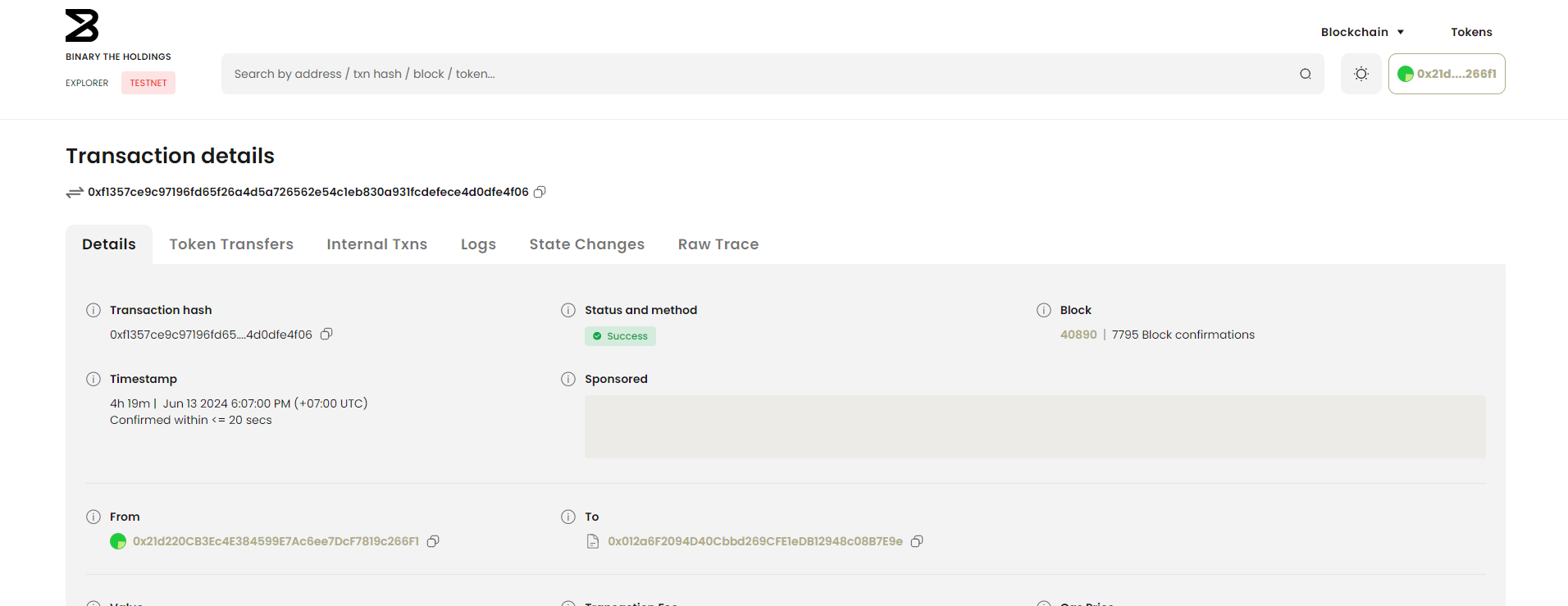
# Introduction

### Welcome to The Binary Holdings (TBH)

The Binary Holdings builds the complete digital infrastructure that empowers national level industries to monetize user engagement. We do this by enabling enterprises to operate seamlessly within existing frameworks. Providing transformation, not disruption.

We have partnered with telecommunication companies in emerging economies across Southeast Asia, serving over 700 million users.&#x20;

Our native utility token, $BNRY, is the native and transaction token within the TBH ecosystem. It also functions as the loyalty token within nation-backed apps like telcos, banks, and e-wallets.

<br>

#### [Tokenomics](/usdbnry/usdbnry-tokenomics)

Explore the $BNRY tokenomics and its integral role within the TBH ecosystem.&#x20;

#### [The Binary Network](/the-binary-network/purpose)

TBH first launched its own testnet, Avalanche Testnet C-Chain, and has now launched its mainnet, The Binary Network. Built on Avalanche, our network ensures robust performance and scalability while underpinning for our entire infrastructure.

#### [Developer's Corner](/developers-corner/network-details)

Welcome, developers! Whether you're here to build on the Binary Network or explore the tools and resources we offer, this document has you covered.

Stay tuned for exciting incentives and opportunities tailored specifically for developers.

### Get Started

Begin your journey with the Binary Network and stay tuned for updates. Start exploring and be part of the future of Web3 infrastructure!


# Product Roadmap

## 2024 <a href="#q1-2024-strategic-investments-integration-and-user-growth" id="q1-2024-strategic-investments-integration-and-user-growth"></a>

### Quarter 1 : Strategic Investments, Integration, and User Growth <a href="#q1-2024-strategic-investments-integration-and-user-growth" id="q1-2024-strategic-investments-integration-and-user-growth"></a>

* **Integration with Indosat:**  Achieve integration with Indosat to expand services and user reach.
* **Investment Initiatives:**
  * **Twin Matrix Technologies:** Leverage spatial intelligence technologies to enhance Fando.ai, setting a new standard in telecom services.
  * **Lost Club Toys:** Develop innovative sticker packs and a Move-To-Earn AR game, designed to increase user engagement and interactivity.
* **Preparation for $BNRY Token Launch:** Ensure all preparations for the token generation event are complete, focusing on legal frameworks, market positioning, and technical infrastructure.
* **Key Metrics:**
  * 40M User Target: achieve 40 million users
  * 1 Telco Integration Goal: Secured telco integration with Indosat

### Quarter 2 : Infrastructure Enhancement and Expansion Goals <a href="#heading-h.9g5mgkpxi6s" id="heading-h.9g5mgkpxi6s"></a>

* **$BNRY Token Launch:** Successfully launch $BNRY tokens on both centralized and decentralized exchanges.
* **Mainnet Launch of The Binary Network (TBN) L2 Rollup:** Ensure a stable and robust platform for applications and $BNRY token transactions.
* **Hackathon Portal Launch and start Hackathon Season 1:** Organise and launch an inaugural quarterly hackathon to promote development on TBN, focusing on the utility of the $BNRY token.
* **TBH Wallet Conceptualization:** Start design and development of a wallet optimized for $BNRY token handling.
* **Key Metrics:**
  * 75m User Target: Expand to 75 million users by enhancing product offerings and marketing strategies.
  * **3 Telco Integration Goal:** Secure 2 additional telco integration
  * **1 Hackathon Hosted:** Host 1 hackathon
* **On-Chain Target:**
  * Unique Daily Active Users (DAU): 100,000
  * Unique Monthly Active Users (MAU): 150,000
  * Number of Transactions (Daily): 200,000

### Quarter 3 : Ecosystem Growth and Engagement <a href="#heading-h.jpzunqh99846" id="heading-h.jpzunqh99846"></a>

* **Innovative User Engagement Models:** Introduce Scan-To-Earn and Learn-To-Earn models, rewarding user participation with $BNRY tokens.
* I**mplementation of TBH Wallet :** Implementation of wallet into TBH ecosystem
* **Advocate Program Roll-Out:** Start a program to engage and reward community advocates.
* **Key Metrics:**
  * 100m User Target: Aim to reach 100 million users
  * 5 Telco Integration Goal: Secure 2 additional telco integration
  * 2 Hackathons Hosted : Host a hackathon
  * 2 TBH Products : Products in the TBH ecosystem
* **On-Chain Target:**
  * Unique Daily Active Users (DAU): 500,000
  * Unique Monthly Active Users (MAU): 750,000
  * Number of Transactions (Daily): 1,000,000

### Quarter 4 : Market Introduction and User Expansion <a href="#heading-h.yd6jc831xoiz" id="heading-h.yd6jc831xoiz"></a>

* **TBH Wallet Launch:** Provide a seamless interface for managing tokens like $BNRY
* **Launchpad Roll-Out:** Initiate a launchpad for project kick-offs and funding.
* **NFT Marketplace:** Launch a platform for trading and managing NFTs within the ecosystem.
* **Key Metrics:**
  * **User Target:** Aim to reach 150 million users
  * **7 Telco Integration Goal:** Secure 2 additional telco integration
  * **3 Hackathons Hosted :** Host a hackathon
  * **10 TBH Products :** Products in the TBH ecosystem
* **On-Chain Target:**
  * Unique Daily Active Users (DAU): 1,000,000
  * Unique Monthly Active Users (MAU): 1,500,000
  * Number of Transactions (Daily): 2,000,000

***

## 2025

### Quarter 1: Ecosystem Activation and Expansion <a href="#q1-2025-ecosystem-activation-and-expansion" id="q1-2025-ecosystem-activation-and-expansion"></a>

* **Incubator Program Launch:** Start accepting cohorts for startup support.
* **Key Metrics:**
  * **User Target:** Aim to reach 200 million users
  * **10 Telco Integration Goal:** Secure 3 additional telco integration
  * **5 Hackathons Hosted :** Host 2 hackathons
  * **20 TBH Products:** Products in the TBH ecosystem
* **On-Chain Target:**
  * Unique Daily Active Users (DAU): 1,500,000
  * Unique Monthly Active Users (MAU): 2,250,000
  * Number of Transactions (Daily): 3,000,000

### Quarter 2: Innovation and Community Engagement <a href="#heading-h.20a1q3xuaw3" id="heading-h.20a1q3xuaw3"></a>

* **Launch TBH R\&D Lab:** Focus on new technologies and innovations in blockchain, AI, and cross-chain solutions.
* **Key Metrics:**
  * **User Target:** Aim to reach 250 million users
  * **13 Telco Integration Goal:** Secure 3 additional telco integration
  * **7 Hackathons Hosted :** Host 2 hackathons
  * **30 TBH Products:** Products in the TBH ecosystem
* **On-Chain Target:**
  * Unique Daily Active Users (DAU): 2,500,000
  * Unique Monthly Active Users (MAU): 3,750,000
  * Number of Transactions (Daily): 5,000,000

### Quarter 3: Scaling Innovation and Strategic Partnerships <a href="#heading-h.c3u17c8yleni" id="heading-h.c3u17c8yleni"></a>

* **Launch of Governance Program:** Introduce a retrospective grants award program to support projects annually within the ecosystem.
* **Key Metrics:**
  * **User Target:** Aim to reach 300 million users
  * **16 Telco Integration Goal:** Secure 3 additional telco integration
  * **9 Hackathons Hosted :** Host 2 hackathons
  * **40 TBH Products:** Products in the TBH ecosystem
* **On-Chain Target:**
  * Unique Daily Active Users (DAU): 4,000,000
  * Unique Monthly Active Users (MAU): 6,000,000
  * Number of Transactions (Daily): 8,000,000

### Quarter 4: Establishing a Global Innovation Hub <a href="#heading-h.vz8eivqjinza" id="heading-h.vz8eivqjinza"></a>

* **Strengthen Security Measures:** Implement advanced security frameworks to support the expanding ecosystem.
* **Key Metrics:**
  * **User Target:** Aim to reach 350 million users
  * **19 Telco Integration Goal:** Secure 3 additional telco integration
  * **11 Hackathons Hosted:** Host 2 hackathons
  * **50 TBH Products:** Products in the TBH ecosystem
* **On-Chain Target:**
  * Unique Daily Active Users (DAU): 7,500,000
  * Unique Monthly Active Users (MAU): 11,250,000
  * Number of Transactions (Daily): 15,000,000


# $BNRY Tokenomics

**Name** : BNRY Token

**Ticker** : $BNRY

**Chain** : Avalanche

**Token Address** : <https://optimistic.etherscan.io/token/0xb5090d514bcaca7dafb7e52763658844121f346d>

**Total Supply** : 10,000,000,000 (10 Billion) $BNRY

**Follow us on**[ **our socials** ](/others/links)**to receive the latest updates regarding the migration.**

**Token Raise**

<table><thead><tr><th width="159">Stage</th><th>Price (USD)</th><th>Token MM </th><th>Raise MM (USD) </th><th>FDV (USD)</th></tr></thead><tbody><tr><td>Early Investor </td><td>0.01</td><td>100MM </td><td>1.0 MM</td><td>100 MM</td></tr><tr><td>Seed Sale </td><td>0.03</td><td>150MM </td><td>4.5 MM</td><td>300 MM</td></tr><tr><td>Private Sale </td><td>0.08</td><td>115MM </td><td>9.2 MM</td><td>800 MM</td></tr><tr><td>Public Presale</td><td>0.15</td><td>15MM</td><td>2.25 MM</td><td>1500 MM</td></tr><tr><td>Public Sale</td><td>0.20</td><td>20MM</td><td>4 MM</td><td>2000 MM</td></tr></tbody></table>

**Token Vesting**

<table><thead><tr><th width="161">Stage</th><th width="121">Allocation</th><th>Tokens</th><th width="79">TGE</th><th width="104">Cliff</th><th width="104">Vesting</th><th>Weighted Average TGE</th></tr></thead><tbody><tr><td>Early Investor</td><td>1.00%</td><td>100M</td><td>0%</td><td>12 mths</td><td>48 mths</td><td>0.000%</td></tr><tr><td>Seed Sale</td><td>1.50%</td><td>150M</td><td>0%</td><td>12 mths</td><td>48 mths</td><td>0.000%</td></tr><tr><td>Private Sale</td><td>1.15%</td><td>115M</td><td>0%</td><td>12 mths</td><td>48 mths</td><td>0.000%</td></tr><tr><td>Public Presale</td><td>0.15%</td><td>15M</td><td>50%</td><td></td><td></td><td>0.075%</td></tr><tr><td>Public Sale</td><td>0.20%</td><td>20M</td><td>50%</td><td></td><td></td><td>0.100%</td></tr><tr><td>Treasury</td><td>38.45%</td><td>3.845B</td><td>0%</td><td></td><td></td><td>0.000%</td></tr><tr><td>Market Making</td><td>2.00%</td><td>200M</td><td>2%</td><td>3 mths</td><td>12 mths</td><td>0.040%</td></tr><tr><td>Marketing</td><td>3.50%</td><td>350M</td><td>2%</td><td>3 mths</td><td>48 mths</td><td>0.070%</td></tr><tr><td>Team</td><td>17.00%</td><td>1.70B</td><td>0%</td><td>6 mths</td><td>48 mths</td><td>0.000%</td></tr><tr><td>Advisors</td><td>1.50%</td><td>150M</td><td>0%</td><td>6 mths</td><td>48 mths</td><td>0.000%</td></tr><tr><td>Reward Pool</td><td>33.55%</td><td>3.355B</td><td>0%</td><td></td><td></td><td>0.000%</td></tr><tr><td>Total</td><td>100%</td><td>10.0B</td><td></td><td></td><td></td><td></td></tr></tbody></table>


# $BNRY Utility

Unlike many other tokens, $BNRY is designed with real-life, user-centric utilities that seamlessly integrate into daily activities.

From simplifying mobile payments to rewarding everyday actions, $BNRY offers tangible benefits that enhance both convenience and earning potential.

## Revolutionizing Mobile Payments

$BNRY is transforming mobile payments, making it easier to pay for telecommunications and utility bills directly through an integrated mobile app. Enjoy the convenience of on-the-go payments with lower transaction fees than traditional banking systems.

## Earn More with Every Action

$BNRY makes everyday activities more rewarding through its innovative programs:

* **Engage to Earn:** Get rewarded for engagement through sports and eSports creator monetisation via creator tokenisation.
* **Play to Earn:** Turn leisure into profit. Earn tokens by achieving milestones and winning challenges in games.
* **Learn to Earn:** Enhance your knowledge and wallet. Earn $BNRY tokens by completing micro-courses and quizzes in various fields.

## A Sustainable Reward System

$BNRY creates a sustainable economic ecosystem, integrating the token into daily activities and payments. As more people use $BNRY, its value grows, benefiting all users through increased demand and utility.

## Embrace the Future

$BNRY is not just a cryptocurrency; it's a lifestyle token that offers a smarter, more rewarding way to manage finances and earn from daily activities. Join the revolution, use $BNRY, and watch your everyday actions transform into earnings and opportunities.


# $BNRY points

### Overview

$BNRY points serve as a cornerstone of the Binary Holdings economic model, offering users a way to be rewarded for their engagement and investment in the ecosystem. Points can be earned through a variety of activities, with the primary methods being holding $BNRY tokens and providing liquidity.

### How to Earn $BNRY points?

**1.** [**Holding $BNRY Tokens**](/usdbnry/usdbnry-points/holding-usdbnry)**:**

* Simply by holding $BNRY tokens in your wallet, you accumulate points over time. This incentivizes and rewards long-term holders and supporters of the Binary Holdings ecosystem.
* **Calculation:** If a user holds x amount of $BNRY tokens, and the total supply of  $BNRY is 10,000,000,000, then the user's points for that hour are calculated as

  &#x20;                                                      x/total \* 100,000&#x20;

2. [**Staking**](/usdbnry/usdbnry-points/staking-usdbnry)**:**

* You can earn $BNRY points by staking $BNRY. Staking means locking up your $BNRY at our platform.&#x20;
* Calculation: If a user contributes x amount of $BNRY tokens, and the total $BNRY tokens in the pool is total, then the user's points for that hour are calculated as

  &#x20;                                                                x/total \* 10

&#x20;**3.** [**Providing Liquidity**](/usdbnry/usdbnry-points/providing-liquidity-usdbnry)**:**

* Participate in liquidity mining by contributing to the BNRY/ETH pool on supported DEX platform like Uniswap or SushiSwap.
* **Calculation:** If a user contributes x amount of liquidity, and the total liquidity in the pool is total, then the user's points for that hour are calculated as

  &#x20;                                                                         x/total \* 100

### Why should you hold or stake or do liquidity mining of $BNRY?

* **Rewards**- By staking $BNRY Tokens, you are eligible airdrops by accumulating $BNRY points overtime.&#x20;
* **Priority Access** - You gain unparalleled access to our ecosystem's expanding features and reduced fees, reinforcing your journey with every transaction.
* **Loyalty** -  The longer you stake, the higher your ascent through our tiers of rewards, unlocking greater value and recognition for your loyalty.&#x20;

### Points Allocation

**1. Time-Based Accrual:**

* Points accrue on an hourly basis, ensuring that your rewards are awarded smoothly over time.
* Your ongoing participation is key; the longer you hold or provide liquidity, the more points you earn.

**2. Activity-Based Incentives:**

* Additional activities and community engagements may also qualify for $BNRY points. Keep an eye on community announcements for time-limited events or special initiatives that offer bonus points.

#### Leaderboard and Multipliers

* Your points contribute to your ranking on the Binary Holdings leaderboard, where active community members are recognized.
* Top contributors can earn multipliers on their point earnings, boosting their ability to accrue points faster than standard rates.
* The system includes a multiplier for the top contributors:
  * The top 100 participants receive a 2x points boost.
  * The next 101 to 1000 participants receive a 1.5x points boost.

#### Monitoring Your Points

* You can monitor your points by heading to the [leaderboard](https://bnrytoken.com/leaderboard).
* This transparency ensures that you are always aware of your contributions and can strategize how to maximize your point earnings.

### **Earning Additional Rewards:**

The amount of passive yield earned depends on multipliers achieved through various user activities. These activities can include actively using the platform, promoting the network, and referring others. Additionally, the chosen staking duration compared to other users plays a role.


# Holding $BNRY

### **TBH Holding Model**

The TBH platform introduces a holding model designed to motivate participation from telecommunication operators, service providers, and users.&#x20;

This is the simplest way of earning reward points in which you can earn points by just holding $BNRY points in your wallet.&#x20;

### **How are $BNRY points calculated in Holding Model?**

* Points Earning: Users earn points based on their proportion of the total $BNRY Tokens
* Formula: If a user contributes x amount of $BNRY tokens, and the total $BNRY tokens in the pool is total, then the user's points for that hour are calculated as

&#x20;                                                                 x/total \* 10&#x20;

* Implementation: To implement this, a snapshot of users' balances would need to be taken hourly. Points would then be allocated based on the number of $BNRY tokens each user holds at the time of the snapshot.


# Staking $BNRY

### **Staking Model**

You can earn $BNRY points by staking $BNRY on our platform. Here you just need to lock up your $BNRY on our platform. The longer you stake, the more points you earn.

### **How are $BNRY points calculated in Staking Model?**

* Points Earning: Users earn points based on their proportion of the total $BNRY Tokens
* Formula: If a user contributes x amount of $BNRY tokens, and the total $BNRY tokens in the pool is total, then the user's points for that hour are calculated as

&#x20;                                                                    x/ total \* 10

* Snapshots of user's balance is take hourly and points are allocated hourly on the basis of those snapshots.

### How to Stake <a href="#how-to-stake" id="how-to-stake"></a>

#### 1. Choose a Wallet

To stake your BNRY tokens, connect to your existing wallet or create a new one using the **GET** option provided by one of the following providers:

<figure><img src="https://lh7-us.googleusercontent.com/a8HXIZDNIcV7AIe6Qj-XuLz89_GvyG1S_Tfm4KvS5xWyNR_W-ZZcKQ7b0BS9wx2ECv7TBV1vRil3e8WinS9HLFjMlkChgi7ZqT86iKmWVGkfKVJQXVvwnEonKh_DEDveQ5h6sxzUUepeTbiBgspKyw" alt="" width="563"><figcaption></figcaption></figure>

Make sure your wallet has BNRY tokens to perform the stake operation. Use [Uniswap](https://app.uniswap.org/add/ETH/0xa724ad0C59f178C3d291081b8aE06d3d23Eb5383) or [MEXC Exchange](https://www.mexc.com/exchange/BNRY_USDT?_from=search) to obtain more tokens.

#### 2. Add Optimistic Network and BNRY Token (Metamask for example)

Connect to your **Metamask** wallet and click on **Add Network**

<figure><img src="https://3398477525-files.gitbook.io/~/files/v0/b/gitbook-x-prod.appspot.com/o/spaces%2F5uDxPdaSe2imTpmRB55M%2Fuploads%2FW0TN0b1FIfZiQH5TpEkD%2Fconnect_wallet.png?alt=media&amp;token=77115108-1285-4f6a-83e4-5553c3d1cfb0" alt="" width="339"><figcaption></figcaption></figure>

Choose **OP Mainnet** and click **Approve**

<figure><img src="https://3398477525-files.gitbook.io/~/files/v0/b/gitbook-x-prod.appspot.com/o/spaces%2F5uDxPdaSe2imTpmRB55M%2Fuploads%2FJrP4vz7h3YeOdT6aQfzk%2FOP.%20Main%20Net.png?alt=media&amp;token=1ac31ffa-9cb8-48a2-b136-9136c33e7f18" alt=""><figcaption></figcaption></figure>

Next, switch to **OP Mainnet** and click on **Import tokens**

Token Address: 0xB5090D514BcacA7daFB7E52763658844121f346d

<figure><img src="https://3398477525-files.gitbook.io/~/files/v0/b/gitbook-x-prod.appspot.com/o/spaces%2F5uDxPdaSe2imTpmRB55M%2Fuploads%2FEsNCovqqMk0t9DNSJJef%2FImport%20Token.png?alt=media&amp;token=30aff0d9-4fb6-4483-84af-086d9683f73c" alt=""><figcaption></figcaption></figure>

#### 3. Stake BNRY

After successfully importing the BNRY token, go to the[ $BNRY website](https://www.bnrytoken.com/) and click **Stake Now** to begin.

<figure><img src="https://lh7-us.googleusercontent.com/UuT9R8eSqxFizUPejOg3AoVzw4v3hPK7jItPYmGeljL3kzx6S1jHbvhGhZeO4zeqfIJaURF4WXV7BbLIIT7DlBZlsLZNLuXDWMXrHLTy3-SSHwc5ElLi8xpJzuLWv-oru8gvjrz05fKjjC-ZWnhnqA" alt=""><figcaption></figcaption></figure>

Upon clicking on stake now button, a pop-up will appear where you can enter the desired BNRY value to stake.&#x20;

<figure><img src="https://lh7-us.googleusercontent.com/ONfeguSEOcd5UcwKA8a4pNuZI_iI0CEs1n3PwpYNYf8M-4NMHuqW-Ms7anQU7Z5T-p8Ew4dOPnjFIrUCUytM9vQ7QgoX9N0AN4pz5TnpiIYzNMdJvSGpB2nhqJyaOAlVesc0ypMyVxeej6SSjQBMCw" alt=""><figcaption></figcaption></figure>

Once you have entered your value, click **Approve Staking.**

You will receive confirmation and a signer request on **Metamask** to approve the transaction. Please ensure that you have enough gas fee to perform the transaction.

<figure><img src="https://lh7-us.googleusercontent.com/Z2hcpHpMc36A2TG-WgKDWy1mu9KSRLkxbnRog54Qxa5GAwhgZDilqCiML3ZkXc1I4gBybzKmlKy7P6unqwR-qZ-hVsyO9eC6pIgGFJUcj0B2dNErhZN_DJgS8g94ot5uAxdW4Dw_uHwWu27hVj02fw" alt=""><figcaption></figcaption></figure>

<figure><img src="https://lh7-us.googleusercontent.com/unPLgZDHpCrGd637BDAl62Mo0dz8Q2y5SD2tiburHoXsCXpE9T_pmU_sXYhsY273lqqIJSPbHkOVwZY7l0iOLgfWQ01Fd_kLNI8f2lxyHH6Ddb5VHterL7FdxZIIeuDo4zr15OZ5Nu-WHIhy_y9p9w" alt=""><figcaption></figcaption></figure>

After your transaction is approved on **Metamask**, you will receive a confirmation popup on the website to complete your stakes.

<figure><img src="https://lh7-us.googleusercontent.com/rVaBh7P2XTtu2ess77dbF-NwkcKqSoNc8flDOt5V85-PU_F6OICaJEEE1ZDijTF6saFPlLoM5kiBrhv8hLnMZnXNAtB_od3UzjdPPti6PKkercc3MYMrjZmtEzPw3LregWirgaEPDuoiewL6Q6TO2g" alt=""><figcaption></figcaption></figure>

Then you will  receive a confirmation request on **Metamask** to confirm the transaction

<figure><img src="https://lh7-us.googleusercontent.com/VRTKY6vfAZT8IZ4KIFKr3o-reeVZiSnitq85ob-njPBc4Sulw54kbuqAuFZf39xd7562ktilv4NcGkBe15Zt1bnp7joy9Bti6IyGadJ-lf2T-vqePOGA_yCz_geZWWQhvEjvjNbMRMPQYGoI-MVsGQ" alt=""><figcaption></figcaption></figure>

\
After confirming your transaction on **Metamask**, you will be redirected back to the website and your stake will be updated instantly on the webpage

<figure><img src="https://lh7-us.googleusercontent.com/RcktBOcOgChB5EhGdnySBDNGqiKppiThRlw_5dzY2PnwBuLwdJMUOqXRCcYZaiw-yGQzfrAYGiMQeEiESa1WWINwILbea_mb3N_oqMQz6iNNuMdoTRIMdiO4ad_Xy3YF2zUjAMSNSjSKu61oMBwkfw" alt=""><figcaption></figcaption></figure>

Next Modules contain how to Stake and Unstake $BNRY


# Stake $BNRY

A step-by-step guide on how to stake your $BNRY tokens using our [$BNRY website](https://www.bnrytoken.com/).

### **Step 1:** Choose a Wallet

To stake your BNRY tokens, connect to your existing wallet or create a new one using the **GET** option provided by one of the following providers:

<figure><img src="https://lh7-us.googleusercontent.com/eyAPrG83RlxYFfZTgobwR0AUr3OU8ZzZ6v8sEi6oZLQBTpwl5zLL4pzq7SFmKpuwcCyTRxcREv8RNh1EqwSbm7CI2wOjaVyft01RpdVoibFTIT8A7R7VxcWSUJDq04G1sI_xQ275UjGlRIDxvmjGWZg" alt="" width="563"><figcaption></figcaption></figure>

Make sure your wallet has BNRY tokens to perform the stake operation. Use [Uniswap](https://app.uniswap.org/add/ETH/0xa724ad0C59f178C3d291081b8aE06d3d23Eb5383) or [MEXC Exchange](https://www.mexc.com/exchange/BNRY_USDT?_from=search) to obtain more tokens.

### **Step 2:** Add Optimistic Network

Connect to your wallet (**Metamask** for example) and click on **Add Network**

<figure><img src="https://3398477525-files.gitbook.io/~/files/v0/b/gitbook-x-prod.appspot.com/o/spaces%2F5uDxPdaSe2imTpmRB55M%2Fuploads%2F2ZFnpyTYJEiR35vAIoc6%2FAdd%20Network.png?alt=media&amp;token=edb8d7bc-822e-434d-b474-192c9317dc86" alt="" width="224"><figcaption></figcaption></figure>

Choose **OP Mainnet** and click **Approve**

<figure><img src="https://3398477525-files.gitbook.io/~/files/v0/b/gitbook-x-prod.appspot.com/o/spaces%2F5uDxPdaSe2imTpmRB55M%2Fuploads%2FurF1kHVCkagvmBy1nu9Z%2FOP.%20Main%20Net.png?alt=media&amp;token=4e4ed094-7236-4212-ba6f-2302655eff35" alt="" width="563"><figcaption></figcaption></figure>

### Step 3: Add BNRY Token

> Token Address: 0xB5090D514BcacA7daFB7E52763658844121f346d

Switch to **OP Mainnet** and click on **Import tokens** to enter the token address

<figure><img src="https://3398477525-files.gitbook.io/~/files/v0/b/gitbook-x-prod.appspot.com/o/spaces%2F5uDxPdaSe2imTpmRB55M%2Fuploads%2FDmQTyqYKBCymh3soQLiR%2FImport%20Token.png?alt=media&amp;token=e9cdbeb9-336b-4532-ac50-974fc5b71510" alt="" width="563"><figcaption></figcaption></figure>

### Step 4: Stake BNRY

Connect your Wallet, go to the [$BNRY website](https://www.bnrytoken.com/staking) and click **Stake Now** to begin.

<figure><img src="https://lh7-us.googleusercontent.com/kYOQnd4foV0mlg--Q9PBxuttY326ewgtHs6XvDddPQOYhOSwygDrc53nktk_JhXT-8UN6tZMOp8jlzz75OQ4hzXYJmbaryyEPGjjsrgEzdWdW2DfaIdy4UcfJxOWPCRX5p0C5Qll0zCFF022ubnhTLw" alt="" width="563"><figcaption></figcaption></figure>

Upon clicking on the **“Stake now”** button, a pop-up will appear where you can then enter the desired $BNRY value to stake. Once you have entered your value, click **"Approve Staking"**.

<figure><img src="https://lh7-us.googleusercontent.com/1CIx3lswdLjZr8uock9HmBMj34v6FQ89RrzKp693ydLcURHY4j8jucSTGORglJxPTiZgVzv2qIFqcT7Ow8GkkBRWn5XIpqAyMK_ElD2N_LBMsqqF8XwKeNN_sudn_fjW2R2GCQfdHyerezAHTGhRPV0" alt="" width="563"><figcaption></figcaption></figure>

Upon connecting your wallet, you will receive confirmation and a signer request on to approve the transaction. Please ensure that you have enough gas fee to perform the transaction.<br>

<figure><img src="https://lh7-us.googleusercontent.com/fnDRaz_NJJWbk2N5A_T2trQ7njQ71419WKpS8TuEiFhhVB9cmv5YbunSB5x-9sOC3LQ84tHXPEcki1oOrV_CJVzUN2IiLthF2blcwVd5QZbRpISyFRV_KjFId6T6NCb-d23WAZHUsWpgaI8t0UsIyYM" alt="" width="375"><figcaption></figcaption></figure>

<figure><img src="https://lh7-us.googleusercontent.com/BMUMVXoaj0x36Hk8iXqLpi66xSR_gB7Nn6npdhCH4mHUHTdRMroC6j81GU66rjSJQZSSAesAHacoYC5SEmUZDNaKge7LeBRSlwAl5vSI21XesBkYZRkr6cmRm0Vg3yinih_ApDbcws3jIgtO6420kwE" alt="" width="375"><figcaption></figcaption></figure>

After your transaction is approved on Wallet, you will receive a confirmation popup on the [ $BNRY website](https://www.bnrytoken.com/) to complete staking.&#x20;

You will then receive a confirmation request on your wallet to confirm the transaction.

<figure><img src="https://lh7-us.googleusercontent.com/NMkK0bMyS7FVEJFtqP2jl32hFNkowwru8XCNuqsM_EWV0ZQGIfJbNERiGh53b8fU_FxznwiJ6teVcgGvGVbanjOTh6NJbAB_Co8BDeUuAZZL4GAVv3d-_YNaoTHzEjMkm_PE8ZirqbJQwKTxyB0J0L8" alt="" width="563"><figcaption></figcaption></figure>

<figure><img src="https://lh7-us.googleusercontent.com/B85Vsg-h21UFhpnNrw8DiiZFYbA8NAEW2QFwBXkbTQum98o0gHnltwP3lpC0Vj656UTdIZy6D9AlMAlTP7a7wSMAsRKe65LPGeh2mvQgzr9_qkHYt9f-Jd7nr2V9eBavMEc9sZBfN1ju2rF5NjHtNcc" alt="" width="375"><figcaption></figcaption></figure>

After confirming your transaction on your Wallet, you will be redirected to[ $BNRY website](https://www.bnrytoken.com/) where you will receive a success message and your stakes will be updated instantly on the webpage

<figure><img src="https://lh7-us.googleusercontent.com/n54F2lJslQ1oXyjBSHCPkp95UBI9cw7gr1nzuhYO6wbL-DURv7lBcJIzc-S8XbqB2O0Kqh6LrAaEmICIWs1qxxC-1d910KMEqRBC7up4r0GcuFOsPRCvXSX9WZRXdEBZq5dh08DlsVO5uUuIxVtcT7U" alt="" width="563"><figcaption></figcaption></figure>

### Watch this video tutorial:

{% embed url="<https://www.loom.com/share/540afc8c96b0406eb15c07b565807be3?sid=c7d65e29-79e7-4f65-8724-3601854eaee3>" %}


# Unstake $BNRY

A step-by-step guide on how to Unstake $BNRY tokens using our [$BNRY website](https://www.bnrytoken.com/).

### **Step 1: Connect to your Wallet**

Connect to your existing account with your favorite wallet provider (**Metamask** for example)

<figure><img src="https://3398477525-files.gitbook.io/~/files/v0/b/gitbook-x-prod.appspot.com/o/spaces%2F5uDxPdaSe2imTpmRB55M%2Fuploads%2FdAx0GZbXyi565CyWNW3i%2FMetamask.png?alt=media&amp;token=24892a70-7552-4c66-b327-2c14cdb677ab" alt="" width="219"><figcaption></figcaption></figure>

You need to connect to your wallet that has staked **$BNRY**. Once your wallet is connected, your stakes will be fetched on the [$BNRY website](https://www.bnrytoken.com/).

<figure><img src="https://lh7-us.googleusercontent.com/X3LckdDFjX8rZjz5668U63JfQzGyXZCyxUS4P7kyt_Vy94ZWGD1ABHZ9uHuLqjMcG_z3SSQ1No8G6sEw2XlmM_tTrfNgdxJsm0y91-Gdzq5P77Rw4a5878y2rfoFfHVvT1kJxrhZGTdKRqKWz5t2u9E" alt="" width="563"><figcaption></figcaption></figure>

Enter the number of **$BNRY** to be **Unstaked** and click **Unstake**,&#x20;

<figure><img src="https://lh7-us.googleusercontent.com/q7659VeySpz3f1gqFO-5rJM9fvG5gRjofeGkQ4UDu03CplF780-A7_uqdBaZbf72xIYUoxQfsdYZQJPYVUmU9qOLihquDTYX6NJVNWL3hncXNmNRfRV5wtDLKQKtoTJ-YyXD94GOv01w8g2Xamip9DY" alt="" width="563"><figcaption></figcaption></figure>

Now click **Complete Unstaking** to confirm the disclaimer about the impact on your rewards and multiplier.

<figure><img src="https://3398477525-files.gitbook.io/~/files/v0/b/gitbook-x-prod.appspot.com/o/spaces%2F5uDxPdaSe2imTpmRB55M%2Fuploads%2FMF3txk7d7o1AWWSS9SIg%2FScreenshot%202024-05-03%20at%203.03.22%20PM.png?alt=media&amp;token=ffd232ba-7778-4f21-a2e7-df4d35190a4d" alt="" width="563"><figcaption></figcaption></figure>

### **Step 2: Confirm transaction fee**

Once you confirm the amount of **$BNRY** to **Unstake** on the webpage, a confirmation request with fee details will be sent to your connected wallet

&#x20;   &#x20;

<figure><img src="https://lh7-us.googleusercontent.com/OgaF1LlaVD4KwrT5OMlFd2D6iDc0DoOB0HaXvOB_LidTn4z8z3BZDFRC8ZSzSlbrPiPmEwDWoVKILQT-JvIdI9IOzoV6bmsxu5WM2imHNsSmuxFSuXNEV1yeLHtnMiX_0sUWbttgojQ5rQtlJ36XJ58" alt="" width="375"><figcaption></figcaption></figure>

Upon confirmation of the wallet, the user will be redirected to the webpage with a success message.

<figure><img src="https://lh7-us.googleusercontent.com/MyGiDRclIb2m_b4v5JDxjV95loBOgGU3BOFdIZTxKZzpJnGUu0GgUA36AETjMRl-ctt76pF1QfUoPq6I2y9UCWNmND1tc_7ae2w3pY67IbIpDe-DERfRAzH4OAsLUef3zEDovmG8vOpiY8XdYY5sssY" alt="" width="563"><figcaption></figcaption></figure>

### **Step 3:** Check your stake

After completing the **Unstaking** process, you can check your staked **$BNRY** again on our website.

<figure><img src="https://lh7-us.googleusercontent.com/9-BR6sjTZJQwjmmsX8zcoJoXHjv-oBbUp4i8N7HTPt05XPHBk9GrnRpLJVhg_Z1x95L7to04rt4qVLpyY1MtpQsOT33gZgL4nciqYauPmxDOO0fmBDsbqZynnQKqoz2oRA3oT3CU8YQgBiam9EuXt1k" alt="" width="563"><figcaption></figcaption></figure>

### Watch this video tutorial&#x20;

{% embed url="<https://www.loom.com/share/eafd88fc9a5c4c8f8e88e7accb443f42?sid=b11b473d-d908-4c7a-8afa-d47b2b18e323>" %}


# Providing Liquidity $BNRY

**Introduction to Liquidity Mining**

Liquidity mining is a powerful mechanism in the DeFi ecosystem that rewards users for supplying liquidity to decentralized exchanges (DEXs). By locking up $BNRY in the liquidity pool, participants will earn $BNRY points.

### **How are $BNRY points calculated in Holding Model?**

* Points Earning: Users earn points based on their proportion of the total liquidity in the BNRY/ETH pool on Uniswap V3 featuring a 0.3% fee tier.
* Formula: If a user contributes x amount of liquidity, and the total liquidity in the pool is total, then the user's points for that hour are calculated as

&#x20;                                                                    x/total \* 100&#x20;

* An hourly snapshot of the liquidity pool's state is needed to calculate each participant's share and allocate points accordingly.

Next Modules contain how to provide liquidity and remove liquidity (if provided) on Uniswap

###


# How to provide Liquidity (Uniswap)

You can add liquidity by depositing both $BNRY and $ETH into the designated BNRY/ETH pool.         You need to have both $BNRY as well as $ETH on the **OPTIMISM network (important)** to participate in liquidity pool. To know how to swap $ETH to $BNRY, [Click here](broken://pages/o6pEeC6goMovpvMHiqg4)

A step by step tutorial to participate in LP is provided, video tutorial also present below:&#x20;

### Step 1 - Go to [Uniswap](https://app.uniswap.org/add/ETH/0xB5090D514BcacA7daFB7E52763658844121f346d/3000?minPrice=0.000001\&maxPrice=69464.205250)

### Step 2 - Click on "Connect" at the top right, and choose the wallet of your choice. For example : "Metamask" .&#x20;

**NOTE: Make sure to be on Optimism network**

<figure><img src="https://3398477525-files.gitbook.io/~/files/v0/b/gitbook-x-prod.appspot.com/o/spaces%2F5uDxPdaSe2imTpmRB55M%2Fuploads%2FKPe9T8vnSL4WZBttekI0%2Fimage.png?alt=media&amp;token=1e9aadc2-3882-4a82-b37f-f3a661fd6472" alt=""><figcaption></figcaption></figure>

### Step 3 : Choose 0.30% fee tier.&#x20;

NOTE: This page shows current $BNRY price so might differ time to time.

<figure><img src="https://3398477525-files.gitbook.io/~/files/v0/b/gitbook-x-prod.appspot.com/o/spaces%2F5uDxPdaSe2imTpmRB55M%2Fuploads%2FzF3KrxmAhoXiYlgPU0Y3%2Fimage.png?alt=media&amp;token=4c11c518-d75f-4fad-a0da-b5a57b3bd614" alt=""><figcaption></figcaption></figure>

### Step 4 - Enter the amount of Eth you want to deposit&#x20;

<figure><img src="https://3398477525-files.gitbook.io/~/files/v0/b/gitbook-x-prod.appspot.com/o/spaces%2F5uDxPdaSe2imTpmRB55M%2Fuploads%2FkxQwJp5uBjM3hevk5W4q%2Fimage.png?alt=media&amp;token=e090207a-4350-4674-aec1-2c3eba4057f4" alt=""><figcaption></figcaption></figure>

* Confirming the transaction and paying the gas fee and VOILA! You have successfully participating in Eth/BNRY pool.

### Watch the video tutorial here.

{% embed url="<https://www.loom.com/share/f6c72a4eeabe4c45b3027a678c7e25b3>" %}

**Earning Points:** After you've provided liquidity, you'll start earning points based on the amount of liquidity you've contributed, as outlined in our points system. These points will accumulate hourly, reflecting your ongoing contribution to the ecosystem's liquidity.

**Monitoring and Managing Your Investment:** Uniswap offers tools to monitor your liquidity provision's performance, including your share of the pool, earned fees, and accrued points for your participation in liquidity mining.

### Step 5 - After providing liquidity you can collect your fee hourly.&#x20;

<figure><img src="https://3398477525-files.gitbook.io/~/files/v0/b/gitbook-x-prod.appspot.com/o/spaces%2F5uDxPdaSe2imTpmRB55M%2Fuploads%2FXzxC4CQRwUVubv8FjFPI%2Fimage.png?alt=media&amp;token=9e614dfd-c165-4196-acd8-d73deba10595" alt=""><figcaption></figcaption></figure>

##


# How to remove liquidity

You can remove liquidity by following these easy steps:

### Step 1 : Go to [Uniswap](https://app.uniswap.org/pool). Here you can see your your positions then click on BNRY/ETH

<figure><img src="https://3398477525-files.gitbook.io/~/files/v0/b/gitbook-x-prod.appspot.com/o/spaces%2F5uDxPdaSe2imTpmRB55M%2Fuploads%2FX4FzUtVHY4MPhO9bLOVy%2Fimage.png?alt=media&amp;token=5d28a808-8ef1-4497-844a-95228d3389bd" alt=""><figcaption></figcaption></figure>

### Step 2: Click on  "Remove Liquidity"

<figure><img src="https://3398477525-files.gitbook.io/~/files/v0/b/gitbook-x-prod.appspot.com/o/spaces%2F5uDxPdaSe2imTpmRB55M%2Fuploads%2FXAJkN6EkKJMiunwdu8cC%2Fimage.png?alt=media&amp;token=17f7231a-d94d-47a2-b324-4bc3f89461fb" alt=""><figcaption></figcaption></figure>

## Step 3: Select for how much $BNRY you want to remove liquidity

NOTE: You can collect your liquidity in form of $BNRY as well as $WETH. For receiving in form of $WETH just click on "Collect as WETH" and follow same steps.

<figure><img src="https://3398477525-files.gitbook.io/~/files/v0/b/gitbook-x-prod.appspot.com/o/spaces%2F5uDxPdaSe2imTpmRB55M%2Fuploads%2FyghFOeAEWUtL9yHhxZRn%2Fimage.png?alt=media&amp;token=f02faa2c-95c1-4e44-84d9-cd2ebfd79e19" alt=""><figcaption></figcaption></figure>

### Step 4: click on "Remove"

<figure><img src="https://3398477525-files.gitbook.io/~/files/v0/b/gitbook-x-prod.appspot.com/o/spaces%2F5uDxPdaSe2imTpmRB55M%2Fuploads%2FSOjvP2W6IRxctyBJ9D8e%2Fimage.png?alt=media&amp;token=4da841d9-5d17-4b61-89ff-2ebe43a4e1b6" alt=""><figcaption></figcaption></figure>

### Step 5 : Click on Remove

<figure><img src="https://3398477525-files.gitbook.io/~/files/v0/b/gitbook-x-prod.appspot.com/o/spaces%2F5uDxPdaSe2imTpmRB55M%2Fuploads%2FT3sBkZt5x1kIVwRW9f7o%2Fimage.png?alt=media&amp;token=3af12fbe-3dfc-47a3-912b-073bd5e1fb7d" alt=""><figcaption></figcaption></figure>

### Step 6 : Confirm transaction in wallet&#x20;

<figure><img src="https://3398477525-files.gitbook.io/~/files/v0/b/gitbook-x-prod.appspot.com/o/spaces%2F5uDxPdaSe2imTpmRB55M%2Fuploads%2FTEoUUOUZGfg6WKueJAJX%2Fimage.png?alt=media&amp;token=72ee4378-504e-45b0-b487-d5fc05be696a" alt=""><figcaption></figcaption></figure>

## You have successfully removed your liquidity

<figure><img src="https://3398477525-files.gitbook.io/~/files/v0/b/gitbook-x-prod.appspot.com/o/spaces%2F5uDxPdaSe2imTpmRB55M%2Fuploads%2FvwKVupe7S1MNzSPwuNAH%2Fimage.png?alt=media&amp;token=a23b434a-27d4-4a03-81cc-d65152d8ccca" alt=""><figcaption></figcaption></figure>

### Watch the video tutorial here:

{% embed url="<https://www.loom.com/share/b4abd191fe1448438a4030d8bdd6ced4?sid=7e37d630-e31b-4c70-b345-5397c34c0056>" %}


# Referral Program

TBH's referral program enables you to earn points through referrals. When your referral stakes a minimum of 100 $BNRY, you will receive 10% of the staked amount in **$BNRY points** every hour.

For example: If your friend stakes 100 $BNRY, you will earn 10 $BNRY points per hour.

### How do you get your referral code?

Step 1 - Visit <https://www.bnrytoken.com/> and click on "Connect Wallet"

<figure><img src="https://3398477525-files.gitbook.io/~/files/v0/b/gitbook-x-prod.appspot.com/o/spaces%2F5uDxPdaSe2imTpmRB55M%2Fuploads%2F1DwQYujdq6nKOPp3Cu3s%2Fimage.png?alt=media&amp;token=59851661-6997-48ce-9615-cb68cbe5d3ae" alt=""><figcaption></figcaption></figure>

Step 2 - Click on your wallet address on the top right and click on "Profile" in the drop down box.

<figure><img src="https://3398477525-files.gitbook.io/~/files/v0/b/gitbook-x-prod.appspot.com/o/spaces%2F5uDxPdaSe2imTpmRB55M%2Fuploads%2FYOdG06hlLffLiNFLXVjx%2Fimage.png?alt=media&amp;token=fffe40f2-0d9a-470c-81f4-4ba49bb422a3" alt=""><figcaption></figcaption></figure>

Step 3 - Click on the copy icon to copy your referral code.

<figure><img src="https://3398477525-files.gitbook.io/~/files/v0/b/gitbook-x-prod.appspot.com/o/spaces%2F5uDxPdaSe2imTpmRB55M%2Fuploads%2FGnBTHlzAZcBt14sk3Iyj%2Fimage.png?alt=media&amp;token=5ad53248-1a2b-41e4-a45a-82d969b2b5ed" alt=""><figcaption></figcaption></figure>

Or, Click on the share icon under "Your Referral Link"

<figure><img src="https://3398477525-files.gitbook.io/~/files/v0/b/gitbook-x-prod.appspot.com/o/spaces%2F5uDxPdaSe2imTpmRB55M%2Fuploads%2FNsXrKpWYJMdILQ0RvqL5%2Fimage.png?alt=media&amp;token=324fa069-69b0-49f9-8737-f6324b436c52" alt=""><figcaption></figcaption></figure>

Step 4 - Click on your respective social media icon to share your referral link or click on the copy icon to copy the referral link.&#x20;

<figure><img src="https://3398477525-files.gitbook.io/~/files/v0/b/gitbook-x-prod.appspot.com/o/spaces%2F5uDxPdaSe2imTpmRB55M%2Fuploads%2F2D2fORxC8Zzxx403XJnl%2Fimage.png?alt=media&amp;token=e2325750-581d-4130-a1a1-e611815823cb" alt=""><figcaption></figcaption></figure>

Step 5 - Share your referral link to your respective social media and you are done!

<figure><img src="https://3398477525-files.gitbook.io/~/files/v0/b/gitbook-x-prod.appspot.com/o/spaces%2F5uDxPdaSe2imTpmRB55M%2Fuploads%2FT2WlKLnPbWxvTbt54eMz%2FScreenshot%202024-06-12%20at%201.33.49%E2%80%AFPM%20(1).png?alt=media&amp;token=b76a1bc0-dcfd-42b5-93e6-15afd3e38051" alt=""><figcaption></figcaption></figure>


# $BNRY Bridge

We're bridging the $BNRY Token from the Optimism network to the Binary Network, a custom chain that leverages Optimism tech stack. This transition involves moving the current token balances on the Optimism Mainnet to the Binary Mainnet, facilitating our L2 rollup.

Here are the three steps you need to follow:&#x20;

1. [Bridge $BNRY between Optimism and Ethereum](/usdbnry/usdbnry-bridge/bridge-usdbnry-between-optimism-and-ethereum)
2. [Swap $BNRY on Ethereum](/usdbnry/usdbnry-bridge/swap-usdbnry-on-ethereum)
3. [Bridge $BNRY between Ethereum and Binary](/usdbnry/usdbnry-bridge/bridge-usdbnry-between-ethereum-and-binary)


# Bridge $BNRY between Optimism and Ethereum

This step involves using **Wormhole**, a bridge protocol, to transfer **BNRY tokens** from the **OP (Optimism) L2 network** to the **Ethereum L1 network**. **The OP L2 network** is an **Ethereum Layer 2 scaling solution**, and bridging involves moving tokens from this layer to the **Ethereum mainnet layer**.

### Step 1: Initiating the Transfer

1. Navigate to [Wormhole Bridge](https://portalbridge.com/advanced-tools/#/transfer?sourceChain=optimism\&targetChain=ethereum).&#x20;
2. Connect your wallet

<figure><img src="https://3398477525-files.gitbook.io/~/files/v0/b/gitbook-x-prod.appspot.com/o/spaces%2F5uDxPdaSe2imTpmRB55M%2Fuploads%2FXvXU5VGLliqQN5KiN0oP%2FConnect_wallet_2.png?alt=media&amp;token=28aa1c09-3043-4f0c-b441-9269155c325f" alt="" width="563"><figcaption></figcaption></figure>

<figure><img src="https://3398477525-files.gitbook.io/~/files/v0/b/gitbook-x-prod.appspot.com/o/spaces%2F5uDxPdaSe2imTpmRB55M%2Fuploads%2FeINJoBoj8uJl0pKEWYQs%2FScreenshot%202024-07-29%20153942.png?alt=media&amp;token=c572159a-cbf7-4758-8c25-b07ec2466ead" alt="" width="563"><figcaption></figcaption></figure>

3. Click **Select a token** and paste the [**BNRY token** **address**](https://optimistic.etherscan.io/token/0xb5090d514bcaca7dafb7e52763658844121f346d)

<figure><img src="https://3398477525-files.gitbook.io/~/files/v0/b/gitbook-x-prod.appspot.com/o/spaces%2F5uDxPdaSe2imTpmRB55M%2Fuploads%2FBTxxyZphzvGh9a3jDuBX%2FSelect_token.png?alt=media&amp;token=0adc61c8-59b5-43c1-9b7d-9526999531a1" alt="" width="563"><figcaption></figcaption></figure>

4. Enter the amount of **BNRY tokens** you wish to bridge.

<figure><img src="https://3398477525-files.gitbook.io/~/files/v0/b/gitbook-x-prod.appspot.com/o/spaces%2F5uDxPdaSe2imTpmRB55M%2Fuploads%2FeQgx134omg4Ou2GDukPK%2FChoose%24BNRY.png?alt=media&amp;token=e3cd887c-461e-4d6b-ad4b-f12de21c5c3c" alt="" width="563"><figcaption></figcaption></figure>

5. Approve and confirm the transfer.&#x20;

> Once the transfer is confirmed, you will receive a transaction hash.

<figure><img src="https://3398477525-files.gitbook.io/~/files/v0/b/gitbook-x-prod.appspot.com/o/spaces%2F5uDxPdaSe2imTpmRB55M%2Fuploads%2FiR4rpIxf7cH5CFiqf6QP%2FConfirm1.png?alt=media&amp;token=bd86e67f-36b4-4c32-b585-209340d05132" alt="" width="563"><figcaption></figcaption></figure>

<figure><img src="https://3398477525-files.gitbook.io/~/files/v0/b/gitbook-x-prod.appspot.com/o/spaces%2F5uDxPdaSe2imTpmRB55M%2Fuploads%2FAGfOD3GUQzrWgChELyOY%2FConfirm2.png?alt=media&amp;token=c84f142e-dd88-4bc2-8609-bc0fc4b5fefc" alt="" width="563"><figcaption></figcaption></figure>

<figure><img src="https://3398477525-files.gitbook.io/~/files/v0/b/gitbook-x-prod.appspot.com/o/spaces%2F5uDxPdaSe2imTpmRB55M%2Fuploads%2Fxi2hwRRbJ3nMba2J9FUi%2FScreenshot%202024-07-29%20161524.png?alt=media&amp;token=2f137230-21e3-4380-a4ab-ddad3078752e" alt="" width="563"><figcaption></figcaption></figure>

### Step 2: Wait for Confirmation

* After initiating the transfer, wait for **Wormhole** to process and confirm the transaction
* The transaction needs to receive 13 out of 13 signatures to be ready for redemption.&#x20;
* You can use the transaction hash to monitor on [**Wormhole Explorer**](https://wormholescan.io/)

<figure><img src="https://3398477525-files.gitbook.io/~/files/v0/b/gitbook-x-prod.appspot.com/o/spaces%2F5uDxPdaSe2imTpmRB55M%2Fuploads%2FxFGGhe46vctUC3xnDvId%2FWormholescan.png?alt=media&amp;token=e9512454-00ce-47f3-9c6e-d749f0efa609" alt="" width="563"><figcaption></figcaption></figure>

<figure><img src="https://3398477525-files.gitbook.io/~/files/v0/b/gitbook-x-prod.appspot.com/o/spaces%2F5uDxPdaSe2imTpmRB55M%2Fuploads%2FMMSATrOBNHvD2qxNWtdu%2F13%20signatures.png?alt=media&amp;token=c0a1656d-6819-4e57-aa7b-8b426029ed85" alt="" width="563"><figcaption></figcaption></figure>

### Step 3: Redeeming Tokens on Ethereum

Go to [Wormhole Redeem](https://portalbridge.com/advanced-tools/#/redeem).

1. Connect your wallet and choose **Optimism** as the source chain.
2. Paste the transaction hash.
3. Click on the "**Recover"** button and confirm the transaction.&#x20;

<figure><img src="https://3398477525-files.gitbook.io/~/files/v0/b/gitbook-x-prod.appspot.com/o/spaces%2F5uDxPdaSe2imTpmRB55M%2Fuploads%2FQoAo3BJsXTJNTo3MwoXe%2Fredeem_1.png?alt=media&amp;token=03c89d1e-4f8e-4a62-a759-4a3ec1a27577" alt="" width="563"><figcaption></figcaption></figure>

4. Once confirmed, the bridging process is complete, and your **BNRY tokens** will be available on **Ethereum**.

<figure><img src="https://3398477525-files.gitbook.io/~/files/v0/b/gitbook-x-prod.appspot.com/o/spaces%2F5uDxPdaSe2imTpmRB55M%2Fuploads%2F0tlK66veNgUwZQhyh4W5%2FScreenshot%202024-07-29%20165202.png?alt=media&amp;token=c4aa9fd8-d166-46fd-a356-8fbb1dc60f8d" alt="" width="563"><figcaption></figcaption></figure>


# Swap $BNRY on Ethereum

This tutorial will guide you on how to swap your **BNRY tokens** from the **Optimism** network to the **Ethereum** network.

### Step 1: Prepare for the Swap

1. **Connect your wallet:** Go to the **$BNRY Bridging Page** and connect your wallet.

<figure><img src="https://3398477525-files.gitbook.io/~/files/v0/b/gitbook-x-prod.appspot.com/o/spaces%2F5uDxPdaSe2imTpmRB55M%2Fuploads%2FFvvosCBtQQt6UVdyiQ0w%2FConnect_wallet.png?alt=media&amp;token=e98f2c60-6f15-4349-9b88-c31aa89ea0b6" alt="" width="563"><figcaption></figcaption></figure>

1. **Approve Access:** In the "**Switch Networks**" popup, select "**Ethereum"** and confirm the switch in your wallet.

<figure><img src="https://3398477525-files.gitbook.io/~/files/v0/b/gitbook-x-prod.appspot.com/o/spaces%2F5uDxPdaSe2imTpmRB55M%2Fuploads%2FUBLqrP8iismRYsybjB2d%2FChoose_wallet.png?alt=media&amp;token=c0129127-84e4-4136-9e1c-384cd7b9b64c" alt="" width="563"><figcaption></figcaption></figure>

### **Step 2: Approve the Swap**

1. **Approve Access:** A popup will appear displaying your available OP $BNRY balance. You need to approve the platform to access and swap your tokens. Click "**Approve Bridge**" and confirm the transaction in your wallet.

<figure><img src="https://3398477525-files.gitbook.io/~/files/v0/b/gitbook-x-prod.appspot.com/o/spaces%2F5uDxPdaSe2imTpmRB55M%2Fuploads%2FrqNwNkTuLwnZzreBDv0Y%2FApprove_Bridge.png?alt=media&amp;token=25cdeaa6-711f-4ddc-8095-49c772ee5e8c" alt="" width="563"><figcaption></figcaption></figure>

<figure><img src="https://3398477525-files.gitbook.io/~/files/v0/b/gitbook-x-prod.appspot.com/o/spaces%2F5uDxPdaSe2imTpmRB55M%2Fuploads%2FCff9Y0y1NzYVAY2WNm1W%2FApprove_Bridge_2.png?alt=media&amp;token=4f3000bd-8d86-4178-900a-683999235a35" alt="" width="563"><figcaption></figcaption></figure>

### **Step 3: Submitting your transaction**

1. **Transaction Progress:** Once the approval is confirmed,  a popup window will track the swap transaction's progress. It might take a few moments for the transaction to be confirmed on the blockchain.

<figure><img src="https://3398477525-files.gitbook.io/~/files/v0/b/gitbook-x-prod.appspot.com/o/spaces%2F5uDxPdaSe2imTpmRB55M%2Fuploads%2Fv4amyTGTDs5gDC8BJuYK%2FScreenshot%202024-07-29%20192020.png?alt=media&amp;token=2364ab2d-6731-4d55-85ee-9b10eeb64629" alt="" width="563"><figcaption></figcaption></figure>

2. **Bridging Complete:** Once the transaction is successful, a popup labeled "**Complete Bridge**" will appear. Click "**Complete Bridge**" and "**Confirm**" to confirm the transaction

<figure><img src="https://3398477525-files.gitbook.io/~/files/v0/b/gitbook-x-prod.appspot.com/o/spaces%2F5uDxPdaSe2imTpmRB55M%2Fuploads%2FlYBuE7CrVEkubROiPQyD%2FComplete_1.png?alt=media&amp;token=00bac9bc-c1db-440c-abdf-9bb299f1d861" alt="" width="563"><figcaption></figcaption></figure>

<figure><img src="https://3398477525-files.gitbook.io/~/files/v0/b/gitbook-x-prod.appspot.com/o/spaces%2F5uDxPdaSe2imTpmRB55M%2Fuploads%2FIx9slCZTgTy9p88MfWaS%2FComplete_2.png?alt=media&amp;token=0fcae8c3-bf80-447e-b122-5710ad1a3d0c" alt="" width="563"><figcaption></figcaption></figure>

### **Step 4: Confirmation and Completion**

1. **Confirm Transaction:** The confirmation progress for the transaction will now begin. It might take a few moments for the transaction to be confirmed on the blockchain.

<figure><img src="https://3398477525-files.gitbook.io/~/files/v0/b/gitbook-x-prod.appspot.com/o/spaces%2F5uDxPdaSe2imTpmRB55M%2Fuploads%2Fhfx0uFBE4GgoPLLxJjwg%2FScreenshot%202024-07-29%20221139.png?alt=media&amp;token=e937865d-4da7-4566-b4e4-656ef9f8f377" alt="" width="563"><figcaption></figcaption></figure>

2. **Swap Complete:** Once the transaction is successful, you'll receive a "**Bridging Confirmed**" message. Your $BNRY tokens are now swapped from **Optimism** to **Ethereum**. You can check your wallet and see that the balance has changed.&#x20;

<figure><img src="https://3398477525-files.gitbook.io/~/files/v0/b/gitbook-x-prod.appspot.com/o/spaces%2F5uDxPdaSe2imTpmRB55M%2Fuploads%2FGMHWkmASLVb6RDyaK6i8%2FScreenshot%202024-07-30%20135755.png?alt=media&amp;token=b8016049-a612-47c7-8bff-795d2472902f" alt="" width="563"><figcaption></figcaption></figure>

2. **Verify Your Balance:** Click the "**Verify**" button to check your $BNRY balance on the Ethereum network.

<figure><img src="https://3398477525-files.gitbook.io/~/files/v0/b/gitbook-x-prod.appspot.com/o/spaces%2F5uDxPdaSe2imTpmRB55M%2Fuploads%2FA5a534o1wKWJoodiNdIr%2FBridgingConfirmed_!.png?alt=media&amp;token=4d6bf8aa-8a12-461d-b5fc-2a3c558b4f55" alt="" width="563"><figcaption></figcaption></figure>

<figure><img src="https://3398477525-files.gitbook.io/~/files/v0/b/gitbook-x-prod.appspot.com/o/spaces%2F5uDxPdaSe2imTpmRB55M%2Fuploads%2FZNDhAbsTQHS5tRVGIhwj%2FScreenshot%202024-07-29%20215921.png?alt=media&amp;token=bbacfaa0-67af-4d39-9266-5e001e86590e" alt="" width="563"><figcaption></figcaption></figure>


# Bridge $BNRY between Ethereum and Binary

The bridge facilitates the exchange of user tokens between blockchains. On our bridge, users can convert their **BNRY tokens** from the **Ethereum Mainnet** to the **Binary Mainnet** and vice versa.

This guide provides a step-by-step walkthrough of how to bridge your **BNRY tokens** from the **Binary Mainnet** to the **Ethereum Mainnet** using the **Binary Bridge** interface.

## Deposit Transaction

> Allows users to convert their **BNRY tokens** residing on the **Ethereum Mainnet (L1)** to the **native BNRY token** on the **Binary Mainnet (L2)** within 20 minutes. This conversion requires a gas fee, calculated in **Ethereum**, to be paid for processing the transfer.

Open your browser and navigate to the [Binary Bridge](https://bridge.thebinaryholdings.com/)

1. Connect to your wallet
2. Input the desired amount of **BNRY tokens** you wish to transfer in the provided field.
3. Click the "**Review Deposit**" button. A pop-up window will appear, displaying the transfer details, including the estimated gas fee and transfer time.

<figure><img src="https://3398477525-files.gitbook.io/~/files/v0/b/gitbook-x-prod.appspot.com/o/spaces%2F5uDxPdaSe2imTpmRB55M%2Fuploads%2FX7W5xLM28UWJmWVVCEwO%2FGroup%2056.png?alt=media&amp;token=ec4500ef-3b16-4635-b1eb-523f9aa74e83" alt="" width="563"><figcaption></figcaption></figure>

4. Once you've verified the details, click the "**Confirm Deposit**" button. This action will trigger a transaction.

<figure><img src="https://3398477525-files.gitbook.io/~/files/v0/b/gitbook-x-prod.appspot.com/o/spaces%2F5uDxPdaSe2imTpmRB55M%2Fuploads%2F8ErQ66gcr9tJ3fAJfOPg%2FGroup%2057.png?alt=media&amp;token=45ce2093-83e6-4ba6-bc7c-8d074e401a8c" alt="" width="563"><figcaption></figcaption></figure>

5. Review the gas fee and confirm the transaction.

<figure><img src="https://3398477525-files.gitbook.io/~/files/v0/b/gitbook-x-prod.appspot.com/o/spaces%2F5uDxPdaSe2imTpmRB55M%2Fuploads%2FuvpbBANNWjgesUU0BCPN%2FGroup%2058.png?alt=media&amp;token=ad9addc2-f6ca-47f9-bf04-905418062772" alt="" width="563"><figcaption></figcaption></figure>

6. Verify the transaction

<figure><img src="https://3398477525-files.gitbook.io/~/files/v0/b/gitbook-x-prod.appspot.com/o/spaces%2F5uDxPdaSe2imTpmRB55M%2Fuploads%2FdPwXS2au7hQ1gt8Lp8HI%2Fview_trans.png?alt=media&amp;token=14847f37-19e0-44e0-b2f7-f9296590aa88" alt="" width="563"><figcaption></figcaption></figure>

<figure><img src="https://3398477525-files.gitbook.io/~/files/v0/b/gitbook-x-prod.appspot.com/o/spaces%2F5uDxPdaSe2imTpmRB55M%2Fuploads%2F4XsUuk9MIkL58YZFoR9g%2FScreenshot%202024-07-31%20165403.png?alt=media&amp;token=5472e914-5d1b-4747-a067-8f3b5590e86c" alt="" width="563"><figcaption></figcaption></figure>

## Check Deposit Transaction History

1. Click the "**Activity**" button to navigate to the transaction history page

<figure><img src="https://3398477525-files.gitbook.io/~/files/v0/b/gitbook-x-prod.appspot.com/o/spaces%2F5uDxPdaSe2imTpmRB55M%2Fuploads%2FQgclcnAbMD43MIMS33dM%2FCheck_history.png?alt=media&amp;token=f37bd08f-fd21-48bd-9eb4-28ae0af85bea" alt="" width="563"><figcaption></figcaption></figure>

2. View transaction details

<figure><img src="https://3398477525-files.gitbook.io/~/files/v0/b/gitbook-x-prod.appspot.com/o/spaces%2F5uDxPdaSe2imTpmRB55M%2Fuploads%2FDBDNNitEru4Dplz0sD90%2Fcheck_trans_2.png?alt=media&amp;token=de85f8c1-559a-4331-9964-ba187f3efbc7" alt="" width="563"><figcaption></figcaption></figure>

<figure><img src="https://3398477525-files.gitbook.io/~/files/v0/b/gitbook-x-prod.appspot.com/o/spaces%2F5uDxPdaSe2imTpmRB55M%2Fuploads%2Fk9EMqDUlzeDQze7Oi1WM%2Fcheck_history_2.png?alt=media&amp;token=498279fd-eaa2-4b61-8d8e-d175e91f0f9a" alt="" width="563"><figcaption></figcaption></figure>

<figure><img src="https://3398477525-files.gitbook.io/~/files/v0/b/gitbook-x-prod.appspot.com/o/spaces%2F5uDxPdaSe2imTpmRB55M%2Fuploads%2FrWFaeedVgTsKDDLgl6hs%2FScreenshot%202024-07-31%20171738.png?alt=media&amp;token=6c5224fd-c87c-421c-b177-edbd6f00ce94" alt="" width="563"><figcaption></figcaption></figure>

## Withdraw Transaction

> Allows users to convert their **native BNRY token** on the **Binary Mainnet (L2)** back to **BNRY tokens** residing on the **Ethereum Mainnet (L1)** within seven days. This conversion requires a gas fee, calculated and paid in **BNRY (L2)**, to process the transfer.

Open your browser and navigate to the [Binary Bridge](https://bridge.thebinaryholdings.com/)

1. Connect to your wallet
2. Input the desired amount of **BNRY tokens** you wish to transfer in the provided field.
3. Click the "**Review Withdrawal**" button. A pop-up window will appear, displaying the transfer details, including the estimated gas fee and transfer time.

<figure><img src="https://3398477525-files.gitbook.io/~/files/v0/b/gitbook-x-prod.appspot.com/o/spaces%2F5uDxPdaSe2imTpmRB55M%2Fuploads%2FjXz8tfUJKXpb0aG7Go6U%2FGroup%2054.png?alt=media&amp;token=17007815-9bba-4efb-b145-50ee4d8d7fff" alt="" width="563"><figcaption></figcaption></figure>

4. Once you've verified the details, click the "**Initiate Withdrawal**" button. This action will trigger a transaction.

<figure><img src="https://3398477525-files.gitbook.io/~/files/v0/b/gitbook-x-prod.appspot.com/o/spaces%2F5uDxPdaSe2imTpmRB55M%2Fuploads%2Fwx0e5fPzeoMmNr3eQWbJ%2FGroup%2055.png?alt=media&amp;token=d2472861-7e92-446c-8a5c-256b969cdca4" alt="" width="563"><figcaption></figcaption></figure>

5. Review the gas fee and confirm the transaction.

<figure><img src="https://3398477525-files.gitbook.io/~/files/v0/b/gitbook-x-prod.appspot.com/o/spaces%2F5uDxPdaSe2imTpmRB55M%2Fuploads%2Ffcevpk0RKRlC6tc9C2K2%2FGroup%2055.png?alt=media&amp;token=39f7d848-fe77-44f3-a91f-6a47c4653444" alt="" width="563"><figcaption></figcaption></figure>

6. Verify the transaction

<figure><img src="https://3398477525-files.gitbook.io/~/files/v0/b/gitbook-x-prod.appspot.com/o/spaces%2F5uDxPdaSe2imTpmRB55M%2Fuploads%2FXQLvzj5Xspror2uxt6TH%2FGroup%2054.png?alt=media&amp;token=22c8d2d8-7307-4c4a-a9e8-a9ab3a9af682" alt="" width="563"><figcaption></figcaption></figure>

<figure><img src="https://3398477525-files.gitbook.io/~/files/v0/b/gitbook-x-prod.appspot.com/o/spaces%2F5uDxPdaSe2imTpmRB55M%2Fuploads%2FSI04tu7ssZLXAhYkjGNN%2FScreenshot%202024-07-31%20160605.png?alt=media&amp;token=c85ca81f-420a-41eb-abba-8b2fceee5f5a" alt="" width="563"><figcaption></figcaption></figure>

## Check And Prove Withdraw Transaction&#x20;

When transferring **$BNRY tokens** from **Optimism (Layer 2)** to **Ethereum (Layer 1)**, the process can be understood as follows:

* **Initiate Withdrawal:** You initiate a withdrawal request on the **Optimism network** to transfer **$BNRY tokens**.&#x20;
* **Generate and Submit Proof:** The **Optimism network** generates a cryptographic proof of the transaction, verifying the request. You then submit this proof to the **Ethereum Mainnet**.&#x20;
* **Validation:** The **Ethereum Mainnet** validates the proof to ensure the transaction is legitimate and secure.&#x20;
* **Completion:** Upon successful validation, the **Ethereum Mainnet** updates its records, and the **$BNRY tokens** are transferred to your **Ethereum** wallet.

1. Click the "**Activity**" button to navigate to the transaction history page

<figure><img src="https://3398477525-files.gitbook.io/~/files/v0/b/gitbook-x-prod.appspot.com/o/spaces%2F5uDxPdaSe2imTpmRB55M%2Fuploads%2FYyzXyslcekuQ9kfCA4ce%2FGroup%2059.png?alt=media&amp;token=9f7b50b2-78a6-4286-b7e2-efa263aeb1e1" alt="" width="563"><figcaption></figcaption></figure>

2. View transaction details

<figure><img src="https://3398477525-files.gitbook.io/~/files/v0/b/gitbook-x-prod.appspot.com/o/spaces%2F5uDxPdaSe2imTpmRB55M%2Fuploads%2FHJD4LvfXcb1DbGhsJDfZ%2FGroup%2061.png?alt=media&amp;token=ebaefa54-50df-4b9c-8801-696025393c46" alt="" width="563"><figcaption></figcaption></figure>

3. The initial "**Transaction Details**" pop-up indicates that your withdrawal is "**Initiated**." Click the "**Prove Withdrawal**" button.

<figure><img src="https://3398477525-files.gitbook.io/~/files/v0/b/gitbook-x-prod.appspot.com/o/spaces%2F5uDxPdaSe2imTpmRB55M%2Fuploads%2FGAtI4hOirz3WBJ5gG1Nh%2FGroup%2062.png?alt=media&amp;token=2872e36b-2656-433f-87bb-422f61dfddd3" alt="" width="563"><figcaption></figcaption></figure>

4. Next you need to confirm the proof transaction with your wallet.

<figure><img src="https://3398477525-files.gitbook.io/~/files/v0/b/gitbook-x-prod.appspot.com/o/spaces%2F5uDxPdaSe2imTpmRB55M%2Fuploads%2FWgB3UQEgfyR8TNE7AySu%2FGroup%2063.png?alt=media&amp;token=34ac2e69-b5cd-4434-a6ad-181b4792f7c6" alt="" width="563"><figcaption></figcaption></figure>

5. **Submit Proof to Ethereum:** The "**Finalize Withdrawal**" step on **Ethereum** completes your **BNRY** transfer from **L2**. After a 7-day security period, the "**Finalize Withdrawal**" button activates, allowing you to confirm the transaction and release your **BNRY** on **Ethereum**.

<figure><img src="https://3398477525-files.gitbook.io/~/files/v0/b/gitbook-x-prod.appspot.com/o/spaces%2F5uDxPdaSe2imTpmRB55M%2Fuploads%2FeeWybbVqHMzkmzQbtqoq%2Fimage.png?alt=media&amp;token=e7af7c8d-a8e4-4117-8e22-1b3a647673d4" alt="" width="563"><figcaption></figcaption></figure>

6. **Finalize Withdrawal:** Upon Clicking **"Finalize Withdrawal"** button, a transaction confirmation will appear in your wallet, requiring your signature to complete the process. This step is manual to ensure maximum security and user control. The 7-day challenge period provides time to detect any issues or potential fraud. Finalizing the withdrawal ensures that your funds are securely released on Ethereum, confirming the legitimacy of the transaction and making your BNRY available for use on Ethereum L1.

<figure><img src="https://3398477525-files.gitbook.io/~/files/v0/b/gitbook-x-prod.appspot.com/o/spaces%2F5uDxPdaSe2imTpmRB55M%2Fuploads%2FeRZpYffT0ybBVYEL3uE2%2FWhatsApp%20Image%202024-08-14%20at%2013.10.16_8437f73d.jpg?alt=media&amp;token=41bf13ea-60f4-45cf-98f4-52061f30e57e" alt="" width="563"><figcaption></figcaption></figure>

7. Once the transaction is complete, you can view the details by clicking the "**View in Explorer**" button.

<figure><img src="https://3398477525-files.gitbook.io/~/files/v0/b/gitbook-x-prod.appspot.com/o/spaces%2F5uDxPdaSe2imTpmRB55M%2Fuploads%2FcfxaSFPE6LR5TopKjycq%2FGroup%2063.png?alt=media&amp;token=0940be8d-341f-448e-9908-0a0e86e372c9" alt="" width="563"><figcaption></figcaption></figure>

<figure><img src="https://3398477525-files.gitbook.io/~/files/v0/b/gitbook-x-prod.appspot.com/o/spaces%2F5uDxPdaSe2imTpmRB55M%2Fuploads%2FkN3w1Lj5TVtGlVIgj74O%2FGroup%2064.png?alt=media&amp;token=2a7b1a2e-af01-41ec-a7f7-72eafd0e6bf2" alt="" width="563"><figcaption></figcaption></figure>


# Purpose

With the introduction of The Binary Network on Optimism, TBH aims to establish itself as the web3 infrastructure for telecommunications companies (telcos) globally. This strategic move enables $BNRY to power various dApps specifically designed for telcos, showcasing how everyday people can benefit from web3 through their telecom services.&#x20;

This ensures full compatibility with the Optimism Superchain and the wider Ethereum ecosystem, leveraging Ethereum's robust infrastructure and established protocols to support the innovative applications and services developed for the telecommunications sector.

### Enhanced Scalability and Efficiency

Optimism’s OP Stack addresses scalability through Optimistic Rollups, processing transactions off the main Ethereum chain. This capability is crucial as we serve millions of users in telecom, improving service offerings and customer satisfaction.

### Developer-Friendly Platform

Retaining Ethereum’s developer-friendly environment fosters innovation, enabling rapid enhancement of service offerings and applications.

### Cost Efficiency

Reduced transaction costs enable more competitive pricing, potentially expanding our user base.

### **Telecommunications Integration**

The Binary Network allows for the direct integration of blockchain into existing telecommunications infrastructure. This integration enhances services such as billing, secure data transmission, and customer management.

### Long-Term Strategic Partnership

Integrating OP Stack aligns TBH strategically with an innovative partner, enhancing capabilities and securing a leading position in blockchain technology.

### Enhanced Security

Enhanced security features in The Binary Network ensure compliance with regulatory standards, offering robust cryptographic protocols and continuous monitoring, critical for sectors like telecommunications.

Leveraging advanced cryptographic techniques and continuous security monitoring, The Binary Network offers a secure environment for building and running applications.


# Network Details

## Testnet <a href="#testnet" id="testnet"></a>

| Name            | Value                                                                                         |
| --------------- | --------------------------------------------------------------------------------------------- |
| Network Name    | Binary Sepolia Testnet                                                                        |
| RPC URL         | [https://rpc.testnet.thebinaryholdings.com](<https://rpc.testnet.thebinaryholdings.com&#xA;>) |
| Chain ID        | 625                                                                                           |
| Currency Symbol | $TBNRY                                                                                        |
| Block Explorer  | <https://explorer.sepolia.thebinaryholdings.com>                                              |

## Mainnet <a href="#testnet" id="testnet"></a>

| Name            | Value                                     |
| --------------- | ----------------------------------------- |
| Network Name    | Binary Mainnet                            |
| RPC URL         | <https://rpc.zero.thebinaryholdings.com/> |
| Chain ID        | 624                                       |
| Currency Symbol | $BNRY                                     |
| Block Explorer  | <https://explorer.thebinaryholdings.com/> |

## **BNRY API Documentation**&#x20;

### <https://explorer.thebinaryholdings.com/api-docs>


# Add Network
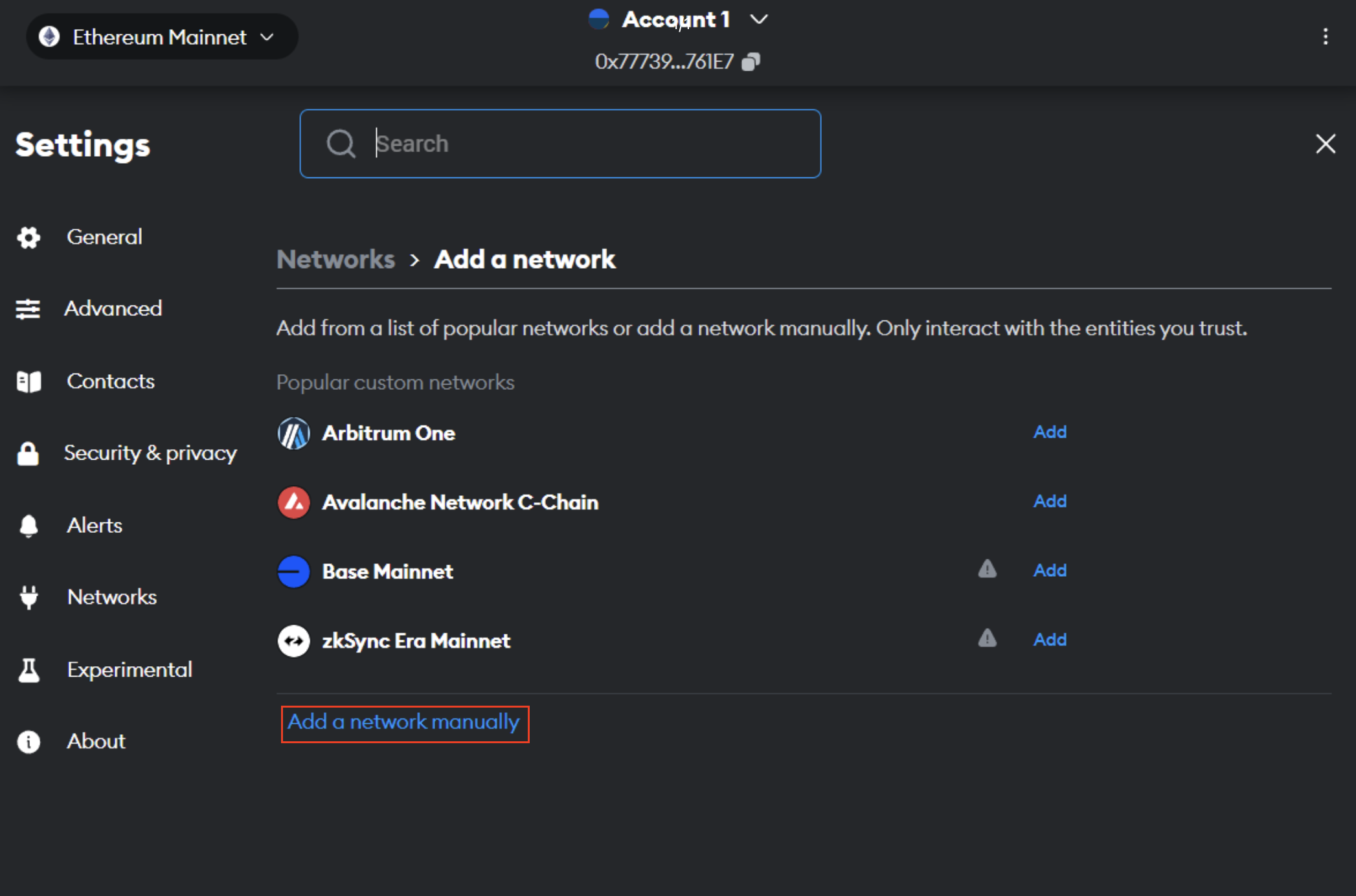
### Metamask

This demo is for Metamask , you can do it on any EVM wallet[**​**](https://docs.base.org/using-base#metamask)

Follow these steps to add The Binary Testnet :

1. Open the MetaMask web browser extension.

<figure><img src="https://3398477525-files.gitbook.io/~/files/v0/b/gitbook-x-prod.appspot.com/o/spaces%2F5uDxPdaSe2imTpmRB55M%2Fuploads%2FGq4FH7mfe4ui9iPtdjVc%2Fimage.png?alt=media&amp;token=7cc93cfa-b027-4e2e-b134-876010a95285" alt=""><figcaption></figcaption></figure>

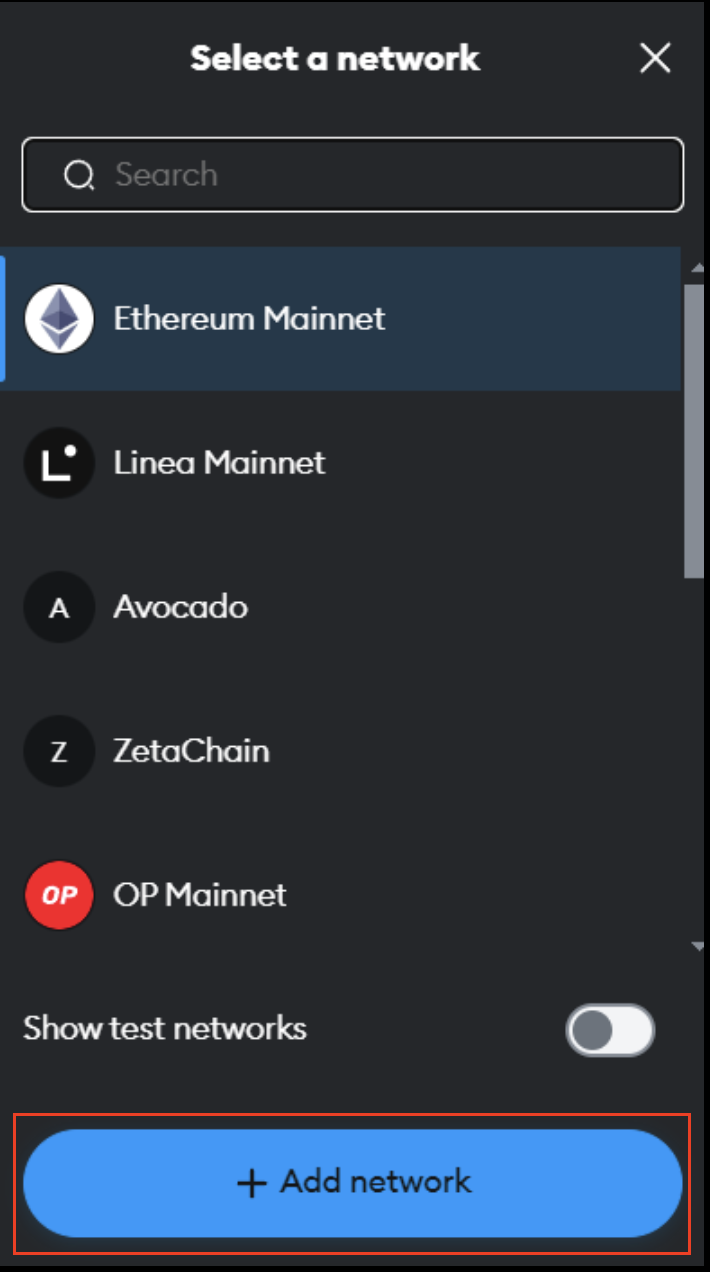
2. Open the network selection dropdown menu by clicking the dropdown button at the top of the extension.

<figure><img src="https://3398477525-files.gitbook.io/~/files/v0/b/gitbook-x-prod.appspot.com/o/spaces%2F5uDxPdaSe2imTpmRB55M%2Fuploads%2FZand3zf0e9CQsTqpE0kK%2FScreenshot%202024-05-31%20at%209.29.54%20PM.png?alt=media&amp;token=ebc83581-ed48-4138-83fb-7f06e2fb3f35" alt="" width="355"><figcaption><p>Add Network</p></figcaption></figure>

3. Click the **Add network** button.

<figure><img src="https://3398477525-files.gitbook.io/~/files/v0/b/gitbook-x-prod.appspot.com/o/spaces%2F5uDxPdaSe2imTpmRB55M%2Fuploads%2FjLVHyOlGlZf3Gu71YFMD%2FScreenshot%202024-05-31%20at%209.32.27%20PM.png?alt=media&amp;token=9bb687bf-affd-4dcf-9a3a-eb7f0b25b421" alt=""><figcaption></figcaption></figure>

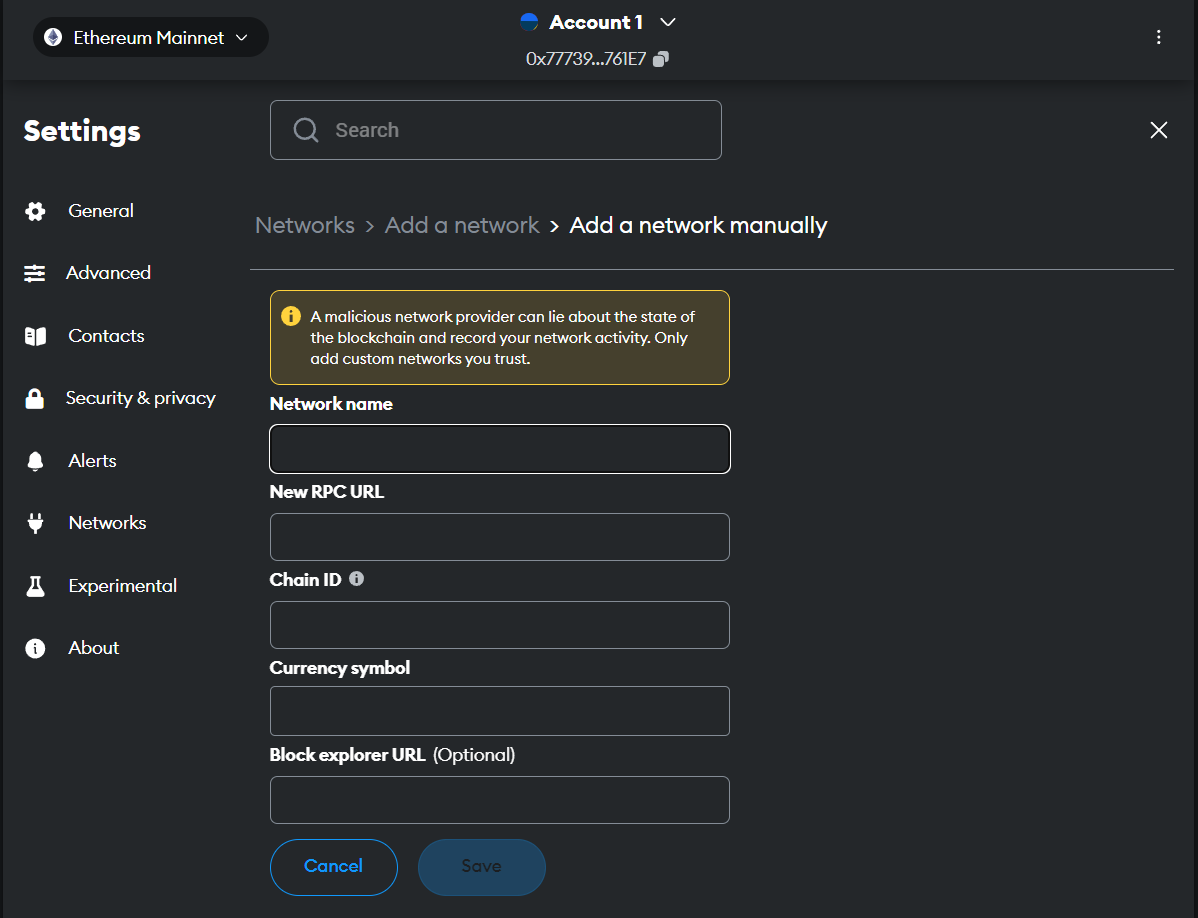
4. Click **Add a network manually**.

<figure><img src="https://3398477525-files.gitbook.io/~/files/v0/b/gitbook-x-prod.appspot.com/o/spaces%2F5uDxPdaSe2imTpmRB55M%2Fuploads%2FJkcZYhn8N487bWyek8vK%2Fimage.png?alt=media&amp;token=82819534-734b-48e4-ad81-397fc2b8106a" alt=""><figcaption></figcaption></figure>

5. In the **Add a network manually** dialog that appears, enter the following information:

| Name            | Value                                                                                         |
| --------------- | --------------------------------------------------------------------------------------------- |
| Network Name    | Binary Testnet                                                                                |
| New RPC URL     | [https://rpc.testnet.thebinaryholdings.com](<https://rpc.testnet.thebinaryholdings.com&#xA;>) |
| Chain ID        | 625                                                                                           |
| Currency Symbol | TBNRY                                                                                         |
| Block Explorer  | <https://explorer.sepolia.thebinaryholdings.com>                                              |

<figure><img src="https://3398477525-files.gitbook.io/~/files/v0/b/gitbook-x-prod.appspot.com/o/spaces%2F5uDxPdaSe2imTpmRB55M%2Fuploads%2FGVuFNN0VQ6fJ5tXNk9Of%2Fimage.png?alt=media&amp;token=be37c39d-a4d4-4551-a3a9-352d987e0700" alt=""><figcaption></figcaption></figure>

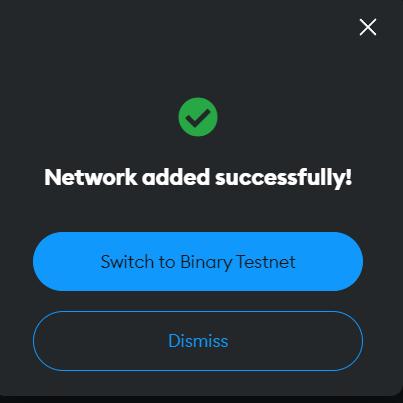
6. Click on **Switch to Binary Testnet**

You will now be connected to Binary Testnet. You can connect to that network anytime by selecting it from the network's dropdown menu.&#x20;


# Deploy your smart contract

### **Prerequisites**

Before deploying, ensure you have Metamask or any other EVM wallet installed on your computer. Follow these steps to add the BNRY network to your wallet, fund it with TBNRY tokens, and deploy your smart contract on the BNRY network.

1. [**Install Metamask**](https://metamask.io/download/) (or any other EVM wallet).
2. [**Add the BNRY Network**](/developers-corner/network-details/add-network)
3. [**Fund Your Wallet**](/developers-corner/faucet)

### **Steps to Deploy Your Smart Contract**

**Open Remix:** Go to [Remix IDE](https://remix.ethereum.org/).

<figure><img src="https://3398477525-files.gitbook.io/~/files/v0/b/gitbook-x-prod.appspot.com/o/spaces%2F5uDxPdaSe2imTpmRB55M%2Fuploads%2FIOUHmhUJnTwmHxjYAyCm%2Fimage.png?alt=media&amp;token=d2a6cb7d-7bdf-42d1-8bf2-87b7f6ac56d7" alt=""><figcaption></figcaption></figure>

1. **Create Your Smart Contract:**

<figure><img src="https://3398477525-files.gitbook.io/~/files/v0/b/gitbook-x-prod.appspot.com/o/spaces%2F5uDxPdaSe2imTpmRB55M%2Fuploads%2FdaA6vR5GW3ufzOLJA7fR%2Fimage.png?alt=media&amp;token=97b1e5cf-f27a-4bf1-98e4-a18ca4855018" alt=""><figcaption></figcaption></figure>

2. **Click on the "Deploy & Run Transactions" tab:**

<figure><img src="https://3398477525-files.gitbook.io/~/files/v0/b/gitbook-x-prod.appspot.com/o/spaces%2F5uDxPdaSe2imTpmRB55M%2Fuploads%2FQv8CARiFuwdl1y4fDBqE%2Fimage.png?alt=media&amp;token=816a0c2d-a76d-40a5-bdb2-3c190d314572" alt=""><figcaption></figcaption></figure>

3. **Choose the Environment as "Injected Provider" with your corresponding wallet name (e.g., "Injected Provider - Metamask"):**

<figure><img src="https://3398477525-files.gitbook.io/~/files/v0/b/gitbook-x-prod.appspot.com/o/spaces%2F5uDxPdaSe2imTpmRB55M%2Fuploads%2FioAp6gOd0eC9SEkHyudA%2Fimage.png?alt=media&amp;token=2aba6690-a38f-4bb2-9c15-772d37427258" alt=""><figcaption></figcaption></figure>

4. **Metamask extension will pop up. Select your wallet for deploying the smart contract:**

<figure><img src="https://3398477525-files.gitbook.io/~/files/v0/b/gitbook-x-prod.appspot.com/o/spaces%2F5uDxPdaSe2imTpmRB55M%2Fuploads%2Feb3qZKuchp9W4vGpEuqQ%2Fimage.png?alt=media&amp;token=fa3dd570-faa7-430e-9d23-60a2b8d1d217" alt=""><figcaption></figcaption></figure>

5. **Switch the network to Binary Testnet:**

<figure><img src="https://3398477525-files.gitbook.io/~/files/v0/b/gitbook-x-prod.appspot.com/o/spaces%2F5uDxPdaSe2imTpmRB55M%2Fuploads%2FfmoNN16teDNMWBTWX5rK%2Fimage.png?alt=media&amp;token=375758c2-e274-4537-a546-37ec8548f795" alt=""><figcaption></figcaption></figure>

6. **Return to Remix and click on "Deploy":**

<figure><img src="https://3398477525-files.gitbook.io/~/files/v0/b/gitbook-x-prod.appspot.com/o/spaces%2F5uDxPdaSe2imTpmRB55M%2Fuploads%2Fw0wsxgxBXdW7iiP3CzXU%2Fimage.png?alt=media&amp;token=f7326d63-0eff-455d-a1cc-2dadbdf04c81" alt=""><figcaption></figcaption></figure>

7. **Confirm the deployment transaction in Metamask (or your chosen EVM wallet):**

<figure><img src="https://3398477525-files.gitbook.io/~/files/v0/b/gitbook-x-prod.appspot.com/o/spaces%2F5uDxPdaSe2imTpmRB55M%2Fuploads%2FNI5RWAS7xV3QxvWLhnCd%2Fimage.png?alt=media&amp;token=3135a13d-7d09-4f28-8e4d-892f5b6e56bb" alt=""><figcaption></figcaption></figure>

### **Verify Deployment**:

1. Check the progress of the deployment in your transaction activity within the wallet:

<figure><img src="https://3398477525-files.gitbook.io/~/files/v0/b/gitbook-x-prod.appspot.com/o/spaces%2F5uDxPdaSe2imTpmRB55M%2Fuploads%2FqphTBjxAl9yVnof2zOOY%2Fimage.png?alt=media&amp;token=cd0719f8-ff2f-4bcb-9956-d68a6e3af22f" alt=""><figcaption></figcaption></figure>

2. Click on the block explorer link for more details:

<figure><img src="https://3398477525-files.gitbook.io/~/files/v0/b/gitbook-x-prod.appspot.com/o/spaces%2F5uDxPdaSe2imTpmRB55M%2Fuploads%2FdX6VgHB0vZzb9iTUMeDu%2Fimage.png?alt=media&amp;token=58032736-65f0-46cd-9776-7e99c8193b53" alt=""><figcaption></figcaption></figure>

Congratulations! You have successfully deployed your smart contract on the BNRY network.


# Contract Addresses

### Ethereum Sepolia Testnet Explorer&#x20;

In this section you will find all the contract address that might be useful for development. Check out these contract address here. Link - <https://sepolia.etherscan.io/>

| Contract                          | Address                                    |
| --------------------------------- | ------------------------------------------ |
| AddressManager                    | 0xc4ee8cB7842f412eCad3F7a2d5da1021d88062A3 |
| AnchorStateRegistry               | 0xcf8c4F698D062DDdEcb89A73B31B8C9b0b3d4723 |
| AnchorStateRegistryProxy          | 0x6cE5eFa22e2de4bE671eF032d5F075c9f2e85A80 |
| DelayedWETH                       | 0x088eeD49bE08C163e45642f5fC194FF9d8Ab676A |
| DelayedWETHProxy                  | 0x6d21d1cD074D9236b3D78744B215F3Bcc9A8917f |
| DisputeGameFactory                | 0x7Bf1d2bdB864aC4C5665dfa5861C4b51F3001Dac |
| DisputeGameFactoryProxy           | 0x47B6A5B2bEa39BaE56cb3B5AA7d2D63D10536834 |
| L1CrossDomainMessenger            | 0x0fd90c388a01f1cD236A6B18D290001293411388 |
| L1CrossDomainMessengerProxy       | 0x4F7674364dFdf6785b40A01eF650DA131071B151 |
| L1ERC721Bridge                    | 0xa6E5113e147EfDB58515D3c1ea041AADfE5DAA15 |
| L1ERC721BridgeProxy               | 0xd7f3C3f6f89B7d170891FD5b12A0d97D01427463 |
| L1StandardBridge                  | 0x136e3Da3Eac02A94A2240cA721701A4D9d97f796 |
| L1StandardBridgeProxy             | 0x291a32ac45fA9adf633CACebe8c29EEc980E1A5C |
| L2OutputOracle                    | 0xbdBEa4a9a3BBD3f153294Fdce8Ed2529f7d4ab1D |
| L2OutputOracleProxy               | 0x9CBE095A6fAeA0186c44F95701b9d1d2e329a58a |
| Mips                              | 0x919d88A6EB8aD1fF6044CCd0B9258440C9FF6e6A |
| OptimismMintableERC20Factory      | 0x64192A1F55c136657eD966d0B4312eCca1Fc69F0 |
| OptimismMintableERC20FactoryProxy | 0x4bd428f3482ab26ed4285152576eeb2f92e873d3 |
| OptimismPortal                    | 0x5122144aaD1252EFF01F92BFCbCDC1D5bEd5bFcC |
| OptimismPortal2                   | 0x68366c5e88d94793ac7673583479d741B7a647C8 |
| OptimismPortalProxy               | 0x91Cccb6fF2d561a3DC71c6072C23dA6055622cdD |
| PreimageOracle                    | 0x184a4E953Cb9d6A26C32d120Ab09726C6571CCd7 |
| ProtocolVersions                  | 0xD269B4452Bf07cc2b7df72137d691Abc54e7e386 |
| ProtocolVersionsProxy             | 0xdd14E3f5643fdb3D85b3E9f73DE28729401Afb06 |
| ProxyAdmin                        | 0xd20f1e27647d469c03E2B1554E98d590b28679f8 |
| SafeProxyFactory                  | 0xa6B71E26C5e0845f74c812102Ca7114b6a896AB2 |
| SafeSingleton                     | 0xd9Db270c1B5E3Bd161E8c8503c55cEABeE709552 |
| SuperchainConfig                  | 0xF3f39698CEFC283c1D4e9f5F00CCa52b849A3122 |
| SuperchainConfigProxy             | 0x0C89131Ca0b4BA3685D3B946D42CFADd36530c04 |
| SystemConfig                      | 0xf727b6432dBD94bF8718Fa24aA2aC7adDefB52aC |
| SystemConfigProxy                 | 0x54C8Fd2EdA49EBA78e0981aA23e10356900812Ee |
| SystemOwnerSafe                   | 0x36DE22dD035B56D1704d6739A668c6eff334A697 |


# Faucet

Fund your wallet with TBNRY tokens from the faucet.

* Go to faucet - &#x20;

<figure><img src="https://3398477525-files.gitbook.io/~/files/v0/b/gitbook-x-prod.appspot.com/o/spaces%2F5uDxPdaSe2imTpmRB55M%2Fuploads%2FxX10uoc21H40maZ1du0Z%2Fimage.png?alt=media&amp;token=befe5d26-5a5b-49c4-a7e1-b000436eb19c" alt=""><figcaption></figcaption></figure>

* Enter your wallet address&#x20;

<figure><img src="https://3398477525-files.gitbook.io/~/files/v0/b/gitbook-x-prod.appspot.com/o/spaces%2F5uDxPdaSe2imTpmRB55M%2Fuploads%2FaEfILqQa1uPpKn4rldaG%2Fimage.png?alt=media&amp;token=22791d4f-3210-47ce-927d-900bf6c3fb23" alt=""><figcaption></figcaption></figure>

* Click on "Request  TBNRY" and TBNRY will be transferred to your wallet

<figure><img src="https://3398477525-files.gitbook.io/~/files/v0/b/gitbook-x-prod.appspot.com/o/spaces%2F5uDxPdaSe2imTpmRB55M%2Fuploads%2Fi1kCbWqOfMBsHqSJVJFE%2Fimage.png?alt=media&amp;token=181fae11-55a7-4792-892c-eedc1286a793" alt=""><figcaption></figcaption></figure>

You will receive those testnet tokens in your wallet.


# Bridge

The bridge facilitates the transfer of assets between different networks.&#x20;

Binary Sepolia Network has enabled bridging of TBNRY (Binary Test tokens). link - <https://bridge.sepolia.thebinaryholdings.com>

Connect your wallet by clicking on "Connect Wallet"

<figure><img src="https://3398477525-files.gitbook.io/~/files/v0/b/gitbook-x-prod.appspot.com/o/spaces%2F5uDxPdaSe2imTpmRB55M%2Fuploads%2FkkYiwIkjilRyhShVlM3B%2Fimage.png?alt=media&amp;token=433cd7f9-b690-4c2f-91af-d16507b09072" alt=""><figcaption></figcaption></figure>

<figure><img src="https://3398477525-files.gitbook.io/~/files/v0/b/gitbook-x-prod.appspot.com/o/spaces%2F5uDxPdaSe2imTpmRB55M%2Fuploads%2FpIUAQG1XhT7ycVUYx1HB%2Fimage.png?alt=media&amp;token=bae5a1c6-d2bb-4d7b-a68a-eb6d8ca4bf06" alt=""><figcaption></figcaption></figure>

Click on your wallet and click "approve" inside your wallet. Your wallet will be connected

<figure><img src="https://3398477525-files.gitbook.io/~/files/v0/b/gitbook-x-prod.appspot.com/o/spaces%2F5uDxPdaSe2imTpmRB55M%2Fuploads%2FUrWOkqEJy8QjGnZnyjab%2Fimage.png?alt=media&amp;token=d9c73149-3596-4305-9e59-27bfd2cfb9e4" alt=""><figcaption></figcaption></figure>

NOTE: You can start bridging only after you receive the testnet tokens from the [faucet](/developers-corner/faucet)

* Deposit - Here, you can bridge TBNRY from Sepolia Eth Network to Binary Sepolia Network.

<figure><img src="https://3398477525-files.gitbook.io/~/files/v0/b/gitbook-x-prod.appspot.com/o/spaces%2F5uDxPdaSe2imTpmRB55M%2Fuploads%2FrMWpwNMFUVaKdrNGruYG%2Fimage.png?alt=media&amp;token=47201e62-92fd-4d27-8e50-3837c5ed4f7b" alt=""><figcaption><p>Depositing funds to Binary Sepolia Network</p></figcaption></figure>

* Withdraw- Here, you can bridge TBNRY from Binary Sepolia Network to Sepolia Eth Network.&#x20;

<figure><img src="https://3398477525-files.gitbook.io/~/files/v0/b/gitbook-x-prod.appspot.com/o/spaces%2F5uDxPdaSe2imTpmRB55M%2Fuploads%2FdvHLBYBeZrpTrsT2iaoe%2Fimage.png?alt=media&amp;token=f7f0b461-491e-42e0-8b21-225a1bee982d" alt=""><figcaption><p>Withdraw from Binary Sepolia Network to Sepolia Eth Network</p></figcaption></figure>


# Block Explorer

A **block explorer** is a tool that allows users to view detailed information about blockchain transactions, blocks, addresses, and other network activity.

Connect your wallet with the explorer[ ](https://bnry.testnet.explorer.zeeve.net/)to see all your smart contracts and transactions made on on the Binary Sepolia Network.&#x20;

**Link to explorer:**  <https://explorer-binaryholdings.cogitus.io/>

[](<https://faucet.sepolia.thebinaryholdings.com&#xD;&#xA;>)

<figure><img src="https://3398477525-files.gitbook.io/~/files/v0/b/gitbook-x-prod.appspot.com/o/spaces%2F5uDxPdaSe2imTpmRB55M%2Fuploads%2FqeQFMdfXsb1ZnDj2f8U9%2FScreenshot%202025-06-19%20at%201.47.28%E2%80%AFPM.png?alt=media&amp;token=22c0dceb-7012-4baa-99bb-35126b190065" alt=""><figcaption></figcaption></figure>

<figure><img src="https://3398477525-files.gitbook.io/~/files/v0/b/gitbook-x-prod.appspot.com/o/spaces%2F5uDxPdaSe2imTpmRB55M%2Fuploads%2FPmkGWnLbvlo63POT7yud%2Fimage.png?alt=media&amp;token=06ae8634-16fa-4123-8cb6-f81bc652ea42" alt=""><figcaption></figcaption></figure>

Approve it in your MetaMask and you are now connected to the explorer!

<figure><img src="https://3398477525-files.gitbook.io/~/files/v0/b/gitbook-x-prod.appspot.com/o/spaces%2F5uDxPdaSe2imTpmRB55M%2Fuploads%2FHetjbZZFcnFvAEF1hu5z%2Fimage.png?alt=media&amp;token=f28b2a77-7e7c-43fd-a1db-8cbdd5e8ae53" alt=""><figcaption></figcaption></figure>

You can also view, verify and interact with your smart contract there.

<figure><img src="https://3398477525-files.gitbook.io/~/files/v0/b/gitbook-x-prod.appspot.com/o/spaces%2F5uDxPdaSe2imTpmRB55M%2Fuploads%2FdA1B3RFb1ATr6XjA8tHK%2FScreenshot%202025-06-19%20at%201.57.05%E2%80%AFPM.png?alt=media&amp;token=b5179c7f-71f9-4e84-a571-7a9cab7bec44" alt=""><figcaption></figcaption></figure>

<figure><img src="https://3398477525-files.gitbook.io/~/files/v0/b/gitbook-x-prod.appspot.com/o/spaces%2F5uDxPdaSe2imTpmRB55M%2Fuploads%2FPwdi3cV0sIm6jRiW38Ak%2FScreenshot%202025-06-19%20at%201.56.31%E2%80%AFPM.png?alt=media&amp;token=361c0325-f56b-48db-ad58-261cc073e9a9" alt=""><figcaption></figcaption></figure>


# Links

### Websites

Main Website - <https://www.thebinaryholdings.com/>

Token Website - <https://bnrytoken.com/>

Network Website - <https://network.thebinaryholdings.com/>&#x20;

Hackathon Portal - <https://hacknative.com/>

### Key Documents

Whitepaper - <https://www.bnrytoken.com/files/BNRY_Whitepaper_v.1.4.pdf>\
Litepaper - <https://www.bnrytoken.com/files/BNRY_Litepaper_V.1.0.pdf>

### Buy $BNRY&#x20;

MEXC - <https://www.mexc.com/exchange/BNRY_USDT>

### Socials

Twitter/X- <https://twitter.com/thebinaryhldgs>

Telegram- <https://t.me/tbhofficialchat>

Discord - <https://discord.gg/Xcgnv5Fq>

Youtube- <https://www.youtube.com/@TheBinaryHoldings>

Blogs - <https://medium.com/@thebinaryholdings>

LinkedIn- <https://www.linkedin.com/company/the-binary-holdings/>

Follow us on our socials to stay updated!